At its core, a trance gate is nothing more than a volume pattern: a held pad carved into rhythm by an LFO. Skip the gate plugin; the LFO editor in Serum 2 does the job better, since you draw the pattern yourself and can point it at anything, not only volume.
The setup is a two-minute job. Getting it to groove is what the rest of this article is for.
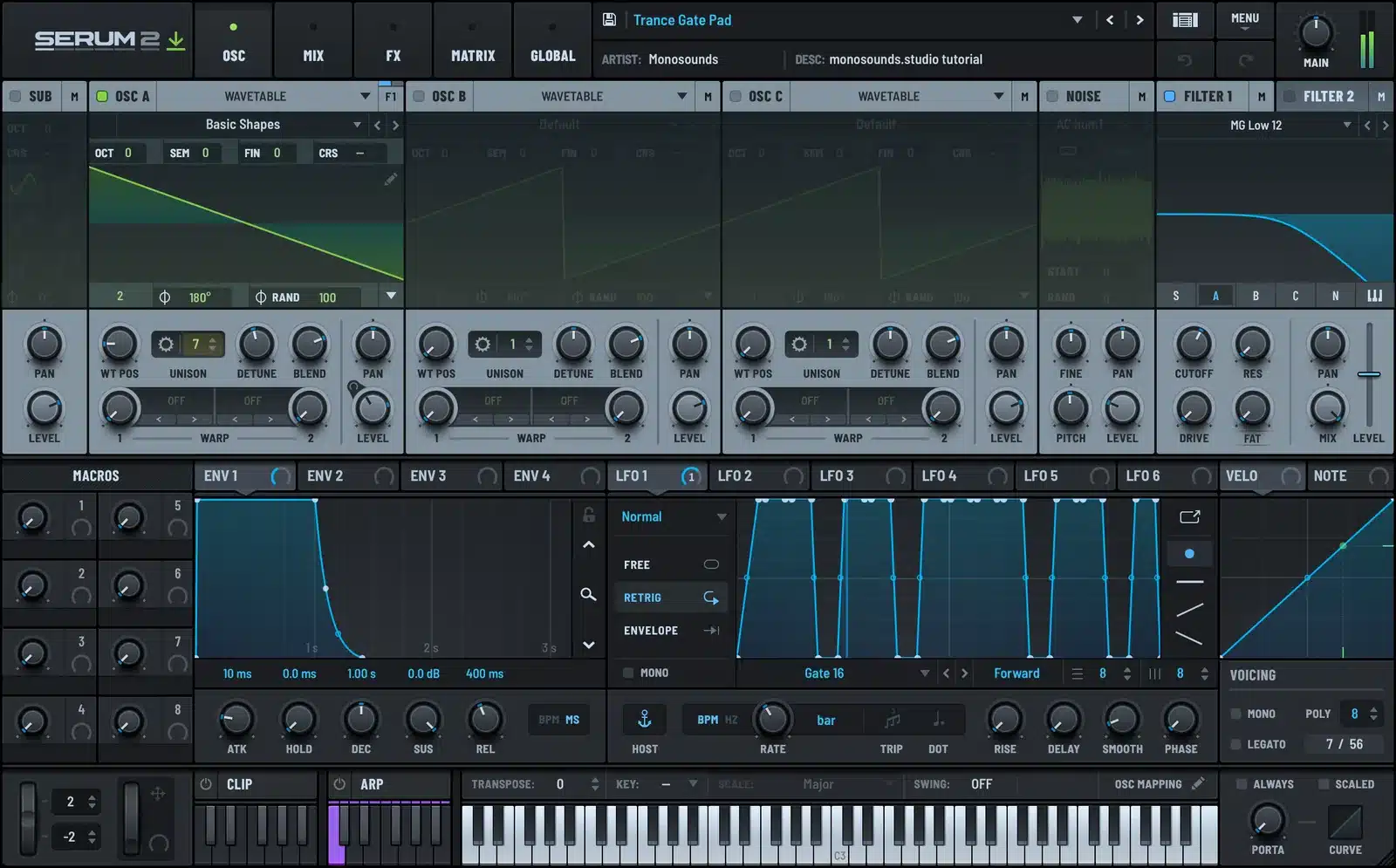
The basic gate
- Begin with a sustained pad: saws, a bit of unison, sustain all the way up.
- Grab an unused LFO and sync its rate to tempo at one bar.
- On a 16-step grid, draw a step pattern across it: steps at full level where you want sound, at zero where you want nothing.
- Send the LFO to patch volume at maximum depth.
Your first pattern should have honest gaps in it: on-on-off-on repeating, something in that family. Turn every step on and you’ve made a tremolo, not a gate. The rhythm lives in the silences.
Kill the clicks
Perfectly vertical step edges click, because the volume is jumping instantly. The fix is to drag each step’s corner points apart a touch, turning every edge into a steep ramp lasting a few milliseconds. To the ear it’s still a hard chop, but the click is gone.
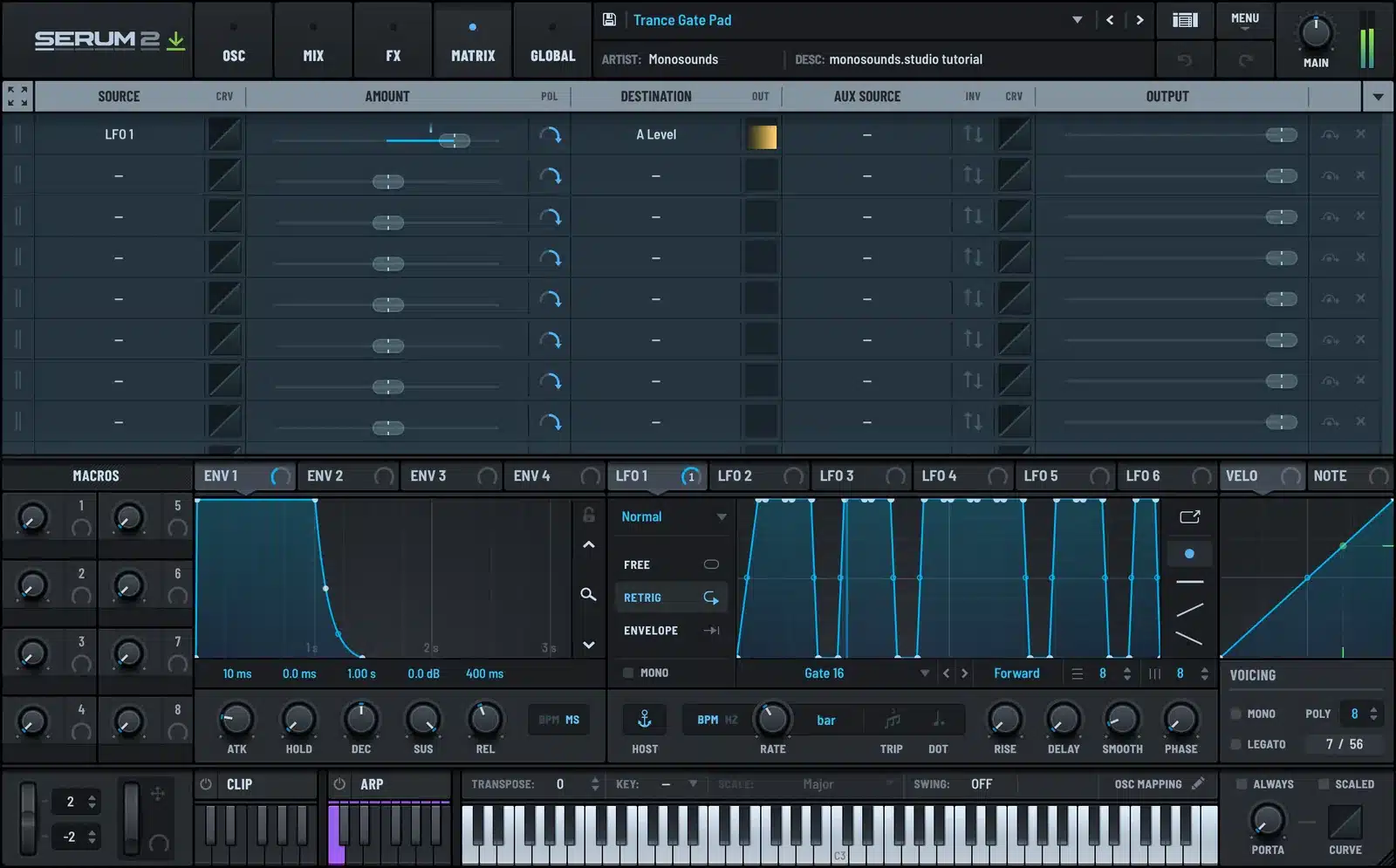
Here’s the non-obvious part: low end makes clicking dramatically worse, because you’re cutting big slow waveforms mid-cycle. So if a gated pad keeps clicking after you’ve sloped the edges, highpass it. Gating a bass-heavy pad means arguing with physics.
Swing and evolution
Two moves separate a musical gate from one that screams “preset”:
- Swing. In the LFO editor, push the off-beat steps slightly late. A shift of just a few percent lets the gate lock in with swung drums instead of wrestling them.
- A second, slower LFO on filter cutoff. While the gate chops volume in 16ths, the filter breathes across 2–4 bars. Fast rhythm over slow motion is the entire trance pad formula.
Map a macro to gate depth as well. That unlocks the classic trance transition: the pad comes in ungated and washy, then the gate fades in across 8 bars while the drums build. One knob of automation, that’s the whole trick.
Pumping without a compressor
Sidechain pump is just one more LFO shape. Draw a single cycle: an instant plunge to near-zero at the start, followed by a curved climb back to full across the beat. Sync to 1/4, route to volume, depth somewhere in the 50–80% range.
The shape of that curve gives the game away. An exponential rise, sluggish at first and then swooping upward, sounds like pumping. A straight linear rise sounds like tremolo. Keep bending the curve until the pad feels shoved down by a kick that doesn’t exist.
The free progressive house presets contain gated and pumping patches made in precisely this way; pop open the LFO panel on any of them and steal the curves.
Gate or arpeggiator?
A gate chops the volume of one chord; an arpeggiator generates new notes. Gating leaves the harmony frozen and hypnotic, the classic trance move. When you’d rather have the rhythm spell out the chord, that’s a job for the arpeggiator and sequencer. Running both at once turns cluttered fast, so give each sound one or the other.
Here’s a house arp demo where a note pattern is covering the ground a gate normally would:
Where the gate breaks
In Serum 2 the effects come after the modulation, which means a long reverb inside the patch will smear straight across the gaps you so carefully drew. Two options: keep any internal reverb short, or gate the patch dry and add the space in your DAW, where you decide what gets chopped. This is the single most common reason a gate “doesn’t work” — the pattern is perfectly fine, the tail is just filling in the holes.
You’ll hear gated pads all over progressive house, and if what you want is a folder of them plus pads worth gating, the Serum 2 preset bundles give you the best cost per patch. Plain math, no sales pitch.
FAQ
Why does my gate click?
Because your step edges are vertical. Give every edge a few milliseconds of slope, and highpass the pad if there’s real bass in it.
1/16 or 1/8 steps?
1/16 delivers that classic driving trance energy around 136–140 BPM. 1/8 is chunkier and sits better at house tempos.
Should the gate restart on every note?
Choose the LFO trigger mode by ear: per-note retrigger keeps chords tight, free-run keeps the pattern glued to the song. My default for pads is retrigger.
Can I gate the reverb too?
Not within Serum 2; effects live after the modulation stage. Print or send the patch dry, then shape the space in your DAW.
One pad, two LFOs, one macro: a complete trance pad rig, and every piece of it something you drew with your own hands, which means the next pattern belongs to you rather than to a preset. Prefer starting from someone else’s curves? Half the gated pads across the Serum 2 preset catalog run on this exact LFO-instead-of-a-compressor trick.

I run Monosounds.studio and make the packs myself. Ten-plus years of producing, 97+ releases, 16,000+ downloads. Every Serum 2 preset we ship passes a CPU check on a mid-range laptop and gets used in a real track before release. If it does not survive a mix, it does not go in the pack.
More about Maxim & the studio →

