Serum 2 ships with 626 factory presets, and if you have bought a few packs you are probably past 2,000. The browser is the only thing standing between you and scrolling. It is good, but most of its features are hidden behind small tabs, and nobody reads the appendix of the manual where they are explained.
Here is the browser front to back, with a screenshot of mine, and the way I organize packs so a sound is never more than one search away.
How to Open the Serum 2 Browser
Click the browser icon to the left of MENU in the top bar, or click the preset name. The main panel is replaced by the browser. Click the icon again to go back to the synth. The arrows either side of the preset name step through presets in the current folder without opening the browser at all.
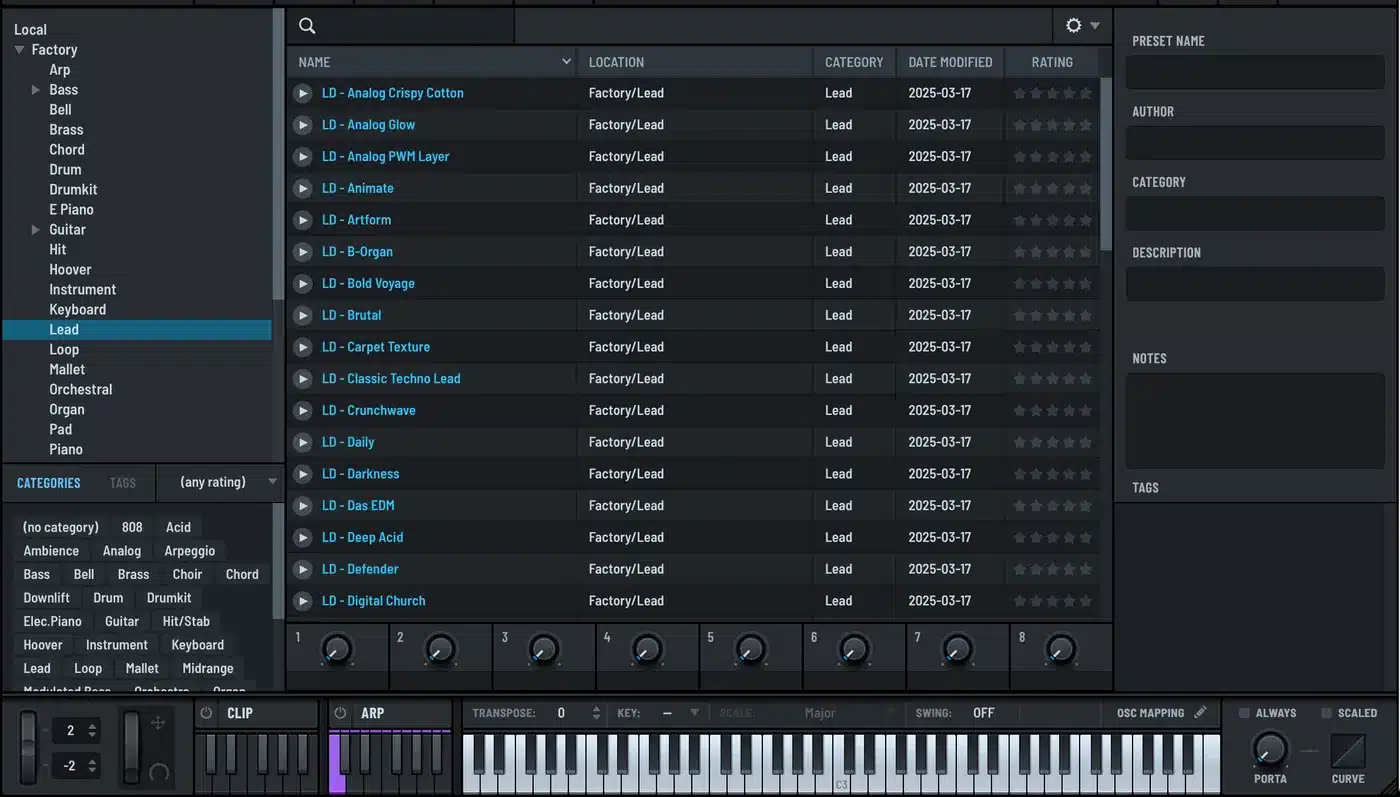
The Three Panes
Folders on the left mirror the Presets folder on disk. Factory, User, and any pack folders you have installed. Select a folder and its presets fill the list. Every search and filter is limited to the folder you have selected, so select the top level to search everything.
The preset list in the middle has columns for name, location, category, date modified and rating. Click a column header to sort by it. Click a preset to load it. Presets with large embedded samples show a green progress bar under the name while loading.
Metadata on the right shows the preset name, author, category, description, notes and tags for the selected preset. All of it is editable, and edits save to the file.
Search, Category and Tag Filters
Type in the search field at the top and press Enter. It matches names, and it respects the folder you have selected. Click the x to clear.
Below the folder tree are two tabs, CATEGORIES and TAGS. Click a category, say Bass, and the list filters to bass presets in the selected folder. Select more than one to widen it. Tags work the same way with the finer descriptors preset makers add, like Analog or Ambience.
The rating dropdown filters by the star rating you have given. It matches exactly, so four stars shows four-star presets only. The (no rating) option shows what you have never rated, which is a good way to work through a new pack.
Previews
Every preset has a play button. If the preset maker embedded a preview clip, you hear that. Otherwise Serum 2 plays a fallback clip, and you can choose which of three fallbacks it uses. There is also an auto-preview option that plays the clip as you step through the list.
This is the feature that separates a good pack from a lazy one. A preset with a proper preview clip tells you what it is for before you play a note. Every preset I make has one, and it is the first thing I check when I evaluate other people’s packs.
Ratings (Your Favorites) and Metadata
Click the stars in the rating column to score a preset. Ratings are yours, not the maker’s. I use a simple system: three stars for anything I might use, five for anything I have used. A search for five stars is then my personal best-of across every pack.
The metadata pane is editable. Fixing the category on a preset that a pack maker left blank makes the category filter work for it. Adding a tag like “used in track X” is a free way to remember where a sound went.
Rename, Move and Rescan From the Browser
Right-click a preset for rename, move, delete and show-in-folder options. Moving presets between folders here keeps Serum 2’s index in sync. If you move files in the Finder or Explorer instead, choose Rescan Folders on Disk from the main menu afterward, or the browser will not see the change.
Getting New Packs Into the Browser
Every pack gets its own folder under User, named with the vendor and pack name. That keeps the folder tree readable and lets the location column tell you where a sound came from. The preset organization guide has the full folder scheme.
Categories come from the folder name inside the pack, so a pack that sorts its presets into Bass, Lead and Pad folders shows up correctly in the category filter with no work. That is how I build mine, and it is worth checking before you buy a pack, because a flat folder of 200 presets with no categories is a chore forever.
Installing a pack is a drag into the User folder. The install guide covers Mac and Windows paths, and the folder location guide is the reference when a pack seems to vanish.
Shortcuts Worth Knowing
The arrows next to the preset name step through the current folder. Double-clicking a preset name in the top bar lets you rename it, if that option is enabled in the GLOBAL tab. Option-clicking the save icon on Mac, or Alt-clicking on Windows, overwrites the current preset without the dialog. The shortcuts article has the rest.
The free Serum 2 preset pack installs into its own folder with categories and preview clips, so it is a good first test of the browser features above. The Serum 2 presets catalog follows the same structure, as do the bundles.
FAQ
How do I search presets in Serum 2?
Open the browser, select the folder to search, type in the search field and press Enter. Use the CATEGORIES and TAGS tabs to filter, and the rating dropdown to show only presets you have rated.
Why does my search return nothing?
Searches are limited to the selected folder. Select the top-level folder to search everything.
How do I preview presets in Serum 2?
Click the play button next to a preset. It plays the embedded preview clip if the maker included one, or a fallback clip you can choose.
How do I rate presets?
Click the stars in the rating column. Ratings are stored with the preset and can be used as a filter.
Why does a new pack not show up in the browser?
Choose Rescan Folders on Disk from the main menu. Serum 2 only scans the presets folder at load and when you ask it to.

I run Monosounds.studio and make the packs myself. Ten-plus years of producing, 97+ releases, 16,000+ downloads. Every Serum 2 preset we ship passes a CPU check on a mid-range laptop and gets used in a real track before release. If it does not survive a mix, it does not go in the pack.
More about Maxim & the studio →

