Since 2022 I’ve made somewhere in the thousands of Serum patches. What sped me up the most wasn’t a better laptop and it wasn’t some controller. It was picking up the Serum 2 shortcuts Xfer never advertises anywhere.
On the surface, Serum 2 reads as a synth full of knobs and menus. In practice it’s a synth you drive with right-clicks and dragging. Nearly every control has a context menu behind it, a modifier key, or somewhere you can drop things. Skip all that and you’re stuck working at half speed.
Below is every shortcut and hidden feature I could actually verify and that I genuinely reach for daily. No made-up tricks, no “pretty sure this works” filler.
The Right-Click Menu Is Half the Synth
One takeaway, if you only keep one: right-click on everything. Sliders, knobs, LFO tabs, the oscillator panels. Nearly every control in Serum 2 has a context menu attached, and that’s where all the quick options are hiding.
Right-clicking a knob shows you that parameter’s modulation options along with MIDI learn. So there’s no digging through the mod matrix to figure out what’s moving your filter cutoff. You get the answer right there on the knob, one click.
Right-click inside the oscillator section and you get copy options for shifting an entire oscillator setup into another slot. I lean on this for layering all the time: make a lead on osc A, copy it across, drop the copy -12 semitones and run it through a low-pass. Width for free, nothing rebuilt.
Still getting oriented in the interface? My Serum 2 beginner guide covers every panel before you start blasting through them at speed.
Modifier Keys Are the Real Serum 2 Shortcuts
Most of the work gets done by three modifier behaviors. Once these are in your hands, knobs stop feeling fiddly.
Shift-drag for fine control. A normal drag is too clumsy when you need detune parked at 0.08 rather than 0.10. Hold shift as you drag and the knob crawls in small steps. Detune, filter cutoff and FX mix knobs get this from me more than anything.
Ctrl-click to reset (Cmd-click on Mac). Any control snaps straight back to its default with one click. Much quicker than guessing where zero used to be. Handy for backing out of a crazy filter drive move without burning your undo history.
Double-click to type a value. Double-clicking a control opens a little numeric box. Need the LFO rate at exactly 1/16, or unison detune sitting at 0.12? Just type it. One warning: some controls keep this disabled until popup text entry is switched on in the preferences, so a dead double-click usually means exactly that.
| Action | Windows | Mac |
|---|---|---|
| Fine-tune a knob | Shift + drag | Shift + drag |
| Snap back to default | Ctrl + click | Cmd + click |
| Enter an exact value | Double-click | Double-click |
| Bring up the context menu | Right-click | Right-click |
| Duplicate an LFO into another slot | Alt + drag LFO tab | Alt + drag LFO tab |
To be fair, none of these Serum 2 shortcuts are actually secrets. The manual lists them. Yet I’ve seen people two years deep into Serum click the same knob forty times chasing a value they could’ve typed in two seconds flat.
Drag and Drop Does More Than You Think
Drag-and-drop is the quickest system in the entire synth, and most producers touch maybe a third of what it can do.
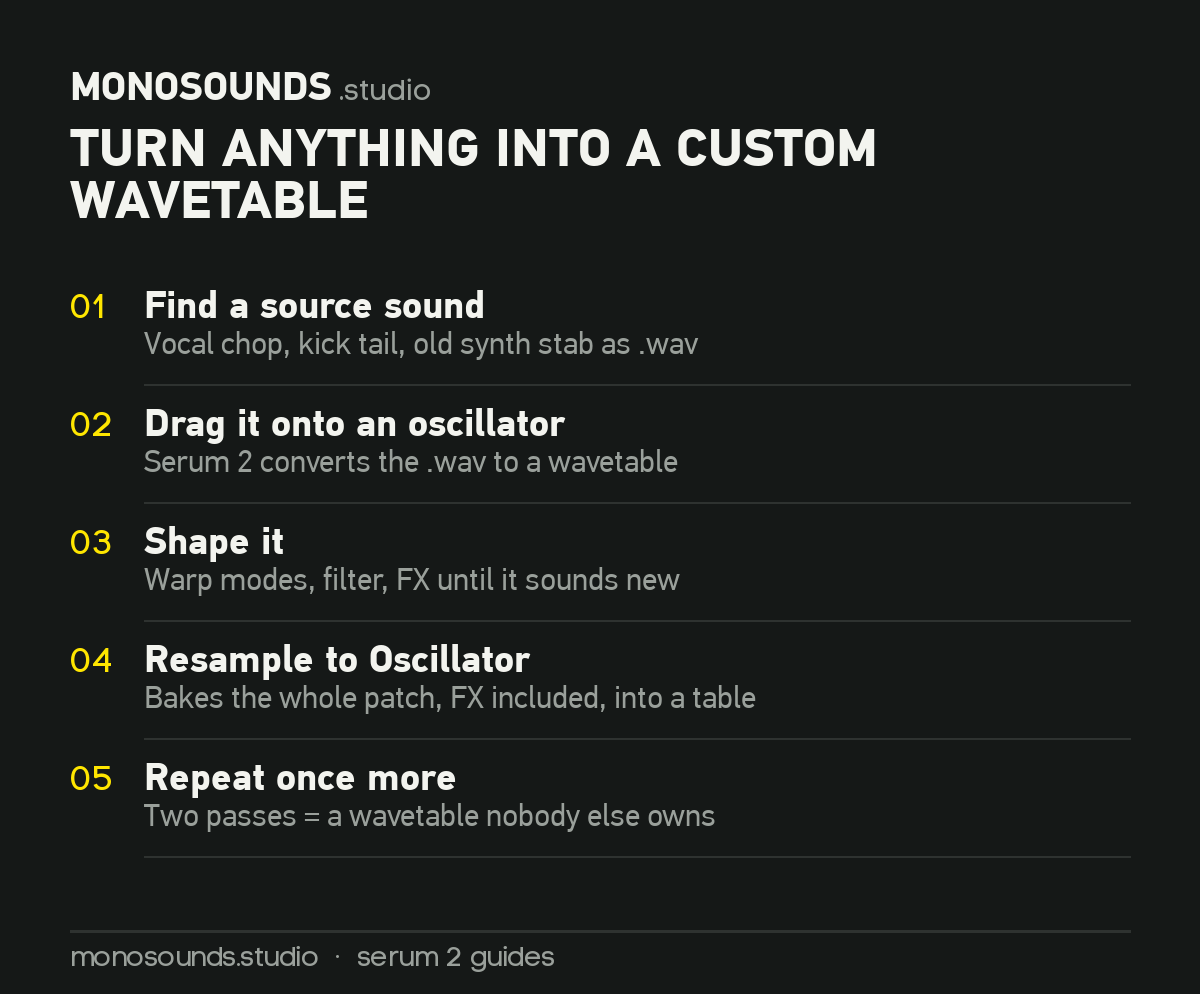
Drag a WAV onto an oscillator. Any .wav dropped straight on an oscillator becomes a wavetable. A vocal chop one-shot, the tail of a kick, some synth stab from a dead project. No better way exists, in my book, to end up with wavetables nobody else owns.
Drag modulation instead of using the matrix. Pick up a mod source, pull it over, let go on any knob. The route appears instantly and you dial the amount on the spot. When things get fancier, say scaling one source by another, the matrix is still the right tool, and my Serum 2 modulation guide goes through that.
Alt-drag an LFO tab to copy it. Hold alt, pull one LFO’s tab over onto another one, and the entire shape carries across. Exactly what you need when two destinations should wobble the same way at different speeds.
Resample to Oscillator. Less a shortcut, more a buried feature. It prints your current patch, effects and all, straight into a fresh wavetable inside an oscillator. Design a sound, resample, then chew up the result with warp modes. Do that two or three times over and you’ve left territory any preset pack can reach.
Curious how these moves look inside real patches? Crack open the 271 patches in our free Serum 2 preset pack. Around half run on resampled oscillators or dragged-in custom wavetables, and pulling them apart teaches faster than any tutorial will.
The LFO Editor Has Its Own Click Language
Nowhere in Serum packs more mouse tricks into less space than the LFO shape editor. Drawing custom shapes without knowing these means wrestling the tool the whole way.
- Double-click anywhere on the grid to add a point. Double-click a point that’s already there and it disappears.
- Shift-click paints stepped shapes snapped to the grid. That’s the quick route to trance gates and fake rhythmic sidechain. Grid at 16, shift-click your pattern, ten seconds, done.
- Alt-drag a point when timing has to be exact and you want it snapped to the grid.
- Alt-drag a curve handle and every curve tension in the whole shape moves together. Turns a hard gate into a smooth pump without touching eight handles individually.
- Ctrl-drag (Cmd on Mac) grabs several points at once so you can shift them as a group.
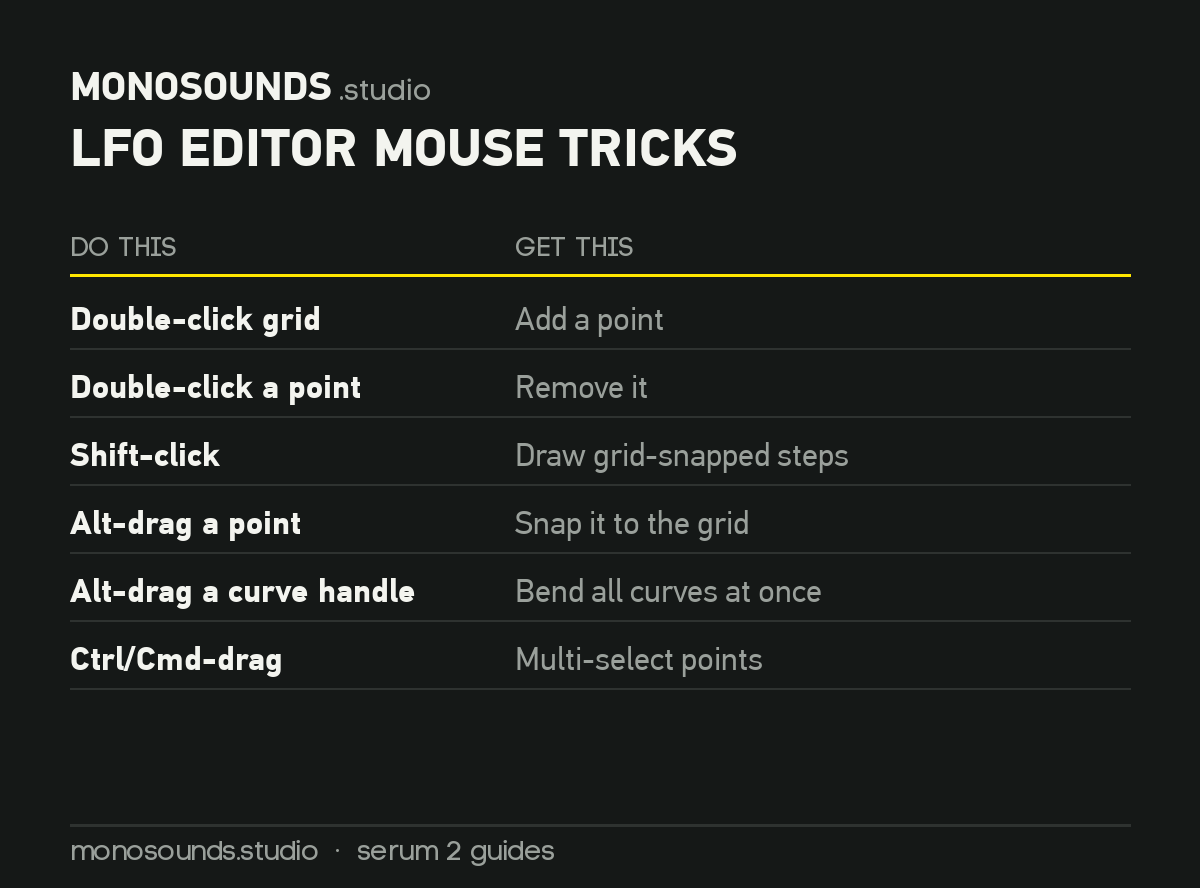
The combo I use most: shift-click a 1/16 step pattern, then alt-drag a single curve handle so every step rounds into a pump. A complete rhythmic gate in well under thirty seconds.
Hidden Features Worth a Detour
The arp’s chord mode. The Serum 2 arpeggiator has a Chord mode where every step triggers a whole chord rather than one note, moving with the pattern. Hold down a single chord shape and out come shifting harmonic stabs. I know no cheaper way to make plucks sound arranged rather than programmed. On top of that the arp holds up to 12 patterns you can flip between live, and each step carries its own note, length, velocity, and direction.
Multiple FX buses. In Serum 1, every oscillator got shoved through a single effects chain. Serum 2 hands you several buses, meaning the bass layer stays dry and mono while the top layer drowns in reverb. Out of pure habit, most people still send everything to bus 1. Splitting buses cleaned up more muddy patches of mine than any EQ ever did. Nearly every layered patch in our NextGen Serum presets runs at least two buses for precisely this reason.
.SerumPack import. Preset installs used to be a folder-digging chore. These days you open the Menu tab, hit Import Preset Pack, and select a .SerumPack file. The subfolders travel with it. And if your browser has already turned into a pile of duplicate packs, I put together a full piece on organizing your Serum 2 presets before things get worse.
Per-effect modulation. All FX parameters are modulation targets now. Envelope on distortion drive, LFO on reverb size. For basslines this changes everything: I run note velocity into Overdrive amount so notes you hit hard bite harder, a move that’s all over my favorite Serum 2 bass presets.
Serum 2 Shortcuts: Questions I Get a Lot
Is there an official list of Serum 2 shortcuts?
Yes. The manual documents the modifier keys and the editor behaviors, and Xfer’s support page is where to look when something changes between versions. Updates do move shortcut details around, so believe the manual for your installed version before you believe an old YouTube video.
Do Serum 1 shortcuts still work in Serum 2?
Nearly everything carried over. Shift for fine control, ctrl or cmd to reset, double-click to type, right-click for menus: the core vocabulary came across intact. Serum 1 presets load as well, so both your muscle memory and your library survive the move. And for Serum 1 owners the upgrade costs nothing.
Why doesn’t double-click value entry work for me?
Look in the preferences. Popup numeric entry lives behind a toggle, and some installs ship with it off. Turn it on and double-click wakes up everywhere in the interface.
What’s the fastest way to actually learn these?
Choose three Serum 2 shortcuts and make yourself use them for a solid week. My picks to start: shift-drag, drag-and-drop modulation, and the right-click menus. Those three alone account for roughly 80 percent of the time saved. Bring in the LFO editor tricks whenever drawing shapes starts to feel slow.
Speed Is a Sound Design Skill
By themselves, these shortcuts won’t improve a single patch. What they do is close the distance between hearing an idea and hearing it tested. If auditioning a modulation route takes two seconds rather than twenty, you end up trying ten times as many ideas. Better patches come from exactly that.
Want a running start? Take our 271 free Serum 2 presets, no signup tricks, royalty-free. Load them, right-click your way around, and study how everything’s wired up. That’s literally how I learned.

I run Monosounds.studio and make the packs myself. Ten-plus years of producing, 97+ releases, 16,000+ downloads. Every Serum 2 preset we ship passes a CPU check on a mid-range laptop and gets used in a real track before release. If it does not survive a mix, it does not go in the pack.
More about Maxim & the studio →Looking for the packs themselves? Here is the whole Serum 2 catalogue — sorted by genre and by sound, with a demo on every one.


