Saving a preset in Serum 2 is one click. Saving a preset that still works when you send it to someone else is three more, and that is the part people skip. Then the preset arrives with a missing wavetable, a silent sampler, and a name like Init 47.
This is the whole process, from the save dialog to a shareable pack, based on how I prepare the presets I sell.
Before You Save
Double-click the ARTIST field under the preset name and type your name. Double-click DESC and write what the sound is for. Both are saved with the preset and show in the browser. Thirty seconds now saves you guessing later.
Name your macros. Double-click the label under each macro. A preset with CUTOFF, DRIVE, SPACE and WIDTH is usable by someone else. A preset with MACRO 1 to 4 is not. The macros guide has my standard layout.
The Save Dialog
Click the disk icon to the left of the preset name. Serum 2 opens its own save panel.
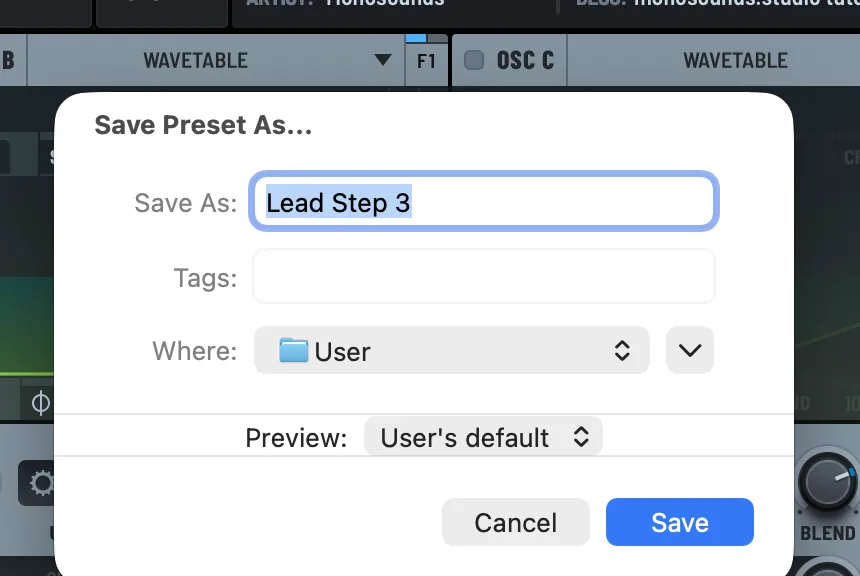
Save As is the file name, and the file name is the preset name. Serum 2 names factory presets with a two-letter prefix and a dash, like BA – Analog Bass or LD – Wide Saw. I follow that. It sorts cleanly and the category is visible even in a flat list.
Tags are free-form descriptors, comma separated. Keep them consistent across a pack. Analog, Dark, Wide, Plucky. The browser’s TAGS filter is only as good as the tags people typed.
Where picks the folder. User is the default. Make a folder per project or per pack, because a User folder with 400 loose presets is where sounds go to be lost.
Preview chooses the clip the browser plays for this preset. User’s default uses the global fallback. Pick a clip from the CLIP section instead and the preset previews with a phrase that suits it. A bass previews with a bassline, a pad with a chord.
Click Save. To overwrite a preset you are already editing, Option-click the disk icon on Mac, Alt-click on Windows, and the dialog is skipped.
Where the File Goes
Presets are .SerumPreset files in the Presets folder inside the Serum 2 Presets folder, under User by default. Open Serum 2 Presets Folder in the main menu takes you straight there. The folder location guide has the paths for Mac and Windows if you need them for a backup script.
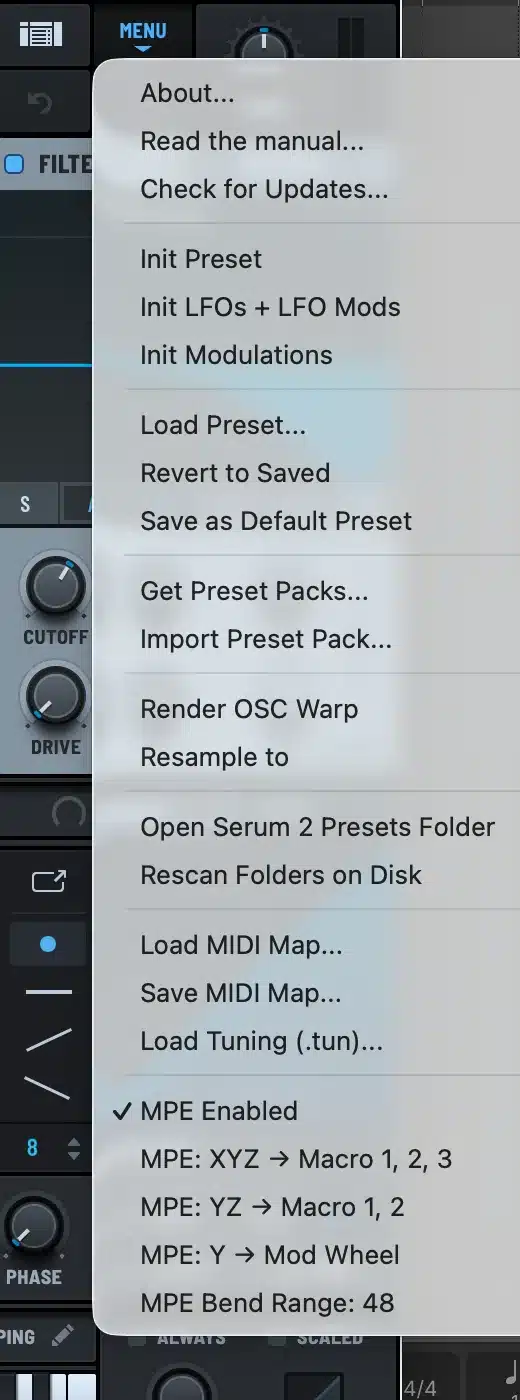
Save as Default Preset
The main menu has Save as Default Preset. Whatever is loaded becomes what Serum 2 opens with, and what Init Preset returns to. I keep a default with my macro names filled in, an EQ high-pass in the FX rack, and the polyphony set to 8. It saves a minute on every new patch. Choose Revert to Saved on the same menu if you overdo it.
Embedding Wavetables and Samples
This is the step that makes a preset portable. A preset stores a reference to its wavetable or sample by path. On your computer that path exists. On someone else’s it does not, and the oscillator loads empty or silent.
Click the name of the wavetable or sample under the oscillator header and choose Embed in Preset from the menu. The content is written into the preset file itself. Factory content cannot be embedded, and does not need to be, because everyone who owns Serum 2 has it.
The cost is file size. A preset with a five-second stereo sample embedded is a few megabytes instead of a few kilobytes. For your own library, do not embed. For anything you share, embed everything that is not factory. Every preset I ship is checked on a clean install of Serum 2 for exactly this reason.
Sharing a Preset or a Pack
For a single preset, send the .SerumPreset file. The other person drops it into their User folder and chooses Rescan Folders on Disk.
For a pack, put the presets in a folder, sorted into category subfolders like Bass, Lead and Pad, because the browser reads the category from the folder name. Zip the folder. The main menu has Import Preset Pack, which unpacks a zip into the right place, so the person on the other end has one step. The install guide describes what they see.
A Checklist
| Step | Why |
|---|---|
| Artist and description filled in | Shows in the browser, survives renaming |
| Macros named and parked mid-range | Preset loads sounding right with room to move |
| Category prefix in the name | Sorts and reads in any list |
| Preview clip chosen | Browser preview makes sense |
| Non-factory content embedded | Works on other machines |
| Level checked, peaks near -6 dBFS | Sits with the rest of a pack |
| Saved into a named folder | Findable later |
Every preset in the free Serum 2 preset pack went through this list, so if you want to see what a finished preset file looks like from the inside, load one and check the metadata, macros and preview. The Serum 2 presets catalog and the bundles follow the same standard.
FAQ
How do I save a preset in Serum 2?
Click the disk icon next to the preset name, type a name, choose a folder and click Save. Option-click or Alt-click the icon to overwrite without the dialog.
Where does Serum 2 save presets?
In the Presets folder inside the Serum 2 Presets folder, under User by default. Open Serum 2 Presets Folder in the main menu opens it.
How do I share a Serum 2 preset with samples?
Click the sample or wavetable name and choose Embed in Preset before saving. The audio is stored inside the preset file and works on any computer with Serum 2.
How do I change the default preset in Serum 2?
Set up the patch you want, then choose Save as Default Preset from the main menu. Init Preset returns to it.
How do I add a preview to a preset?
Choose a clip in the Preview dropdown of the save dialog, or set one up in the CLIP section before saving. The browser plays it when someone presses play.

I run Monosounds.studio and make the packs myself. Ten-plus years of producing, 97+ releases, 16,000+ downloads. Every Serum 2 preset we ship passes a CPU check on a mid-range laptop and gets used in a real track before release. If it does not survive a mix, it does not go in the pack.
More about Maxim & the studio →

