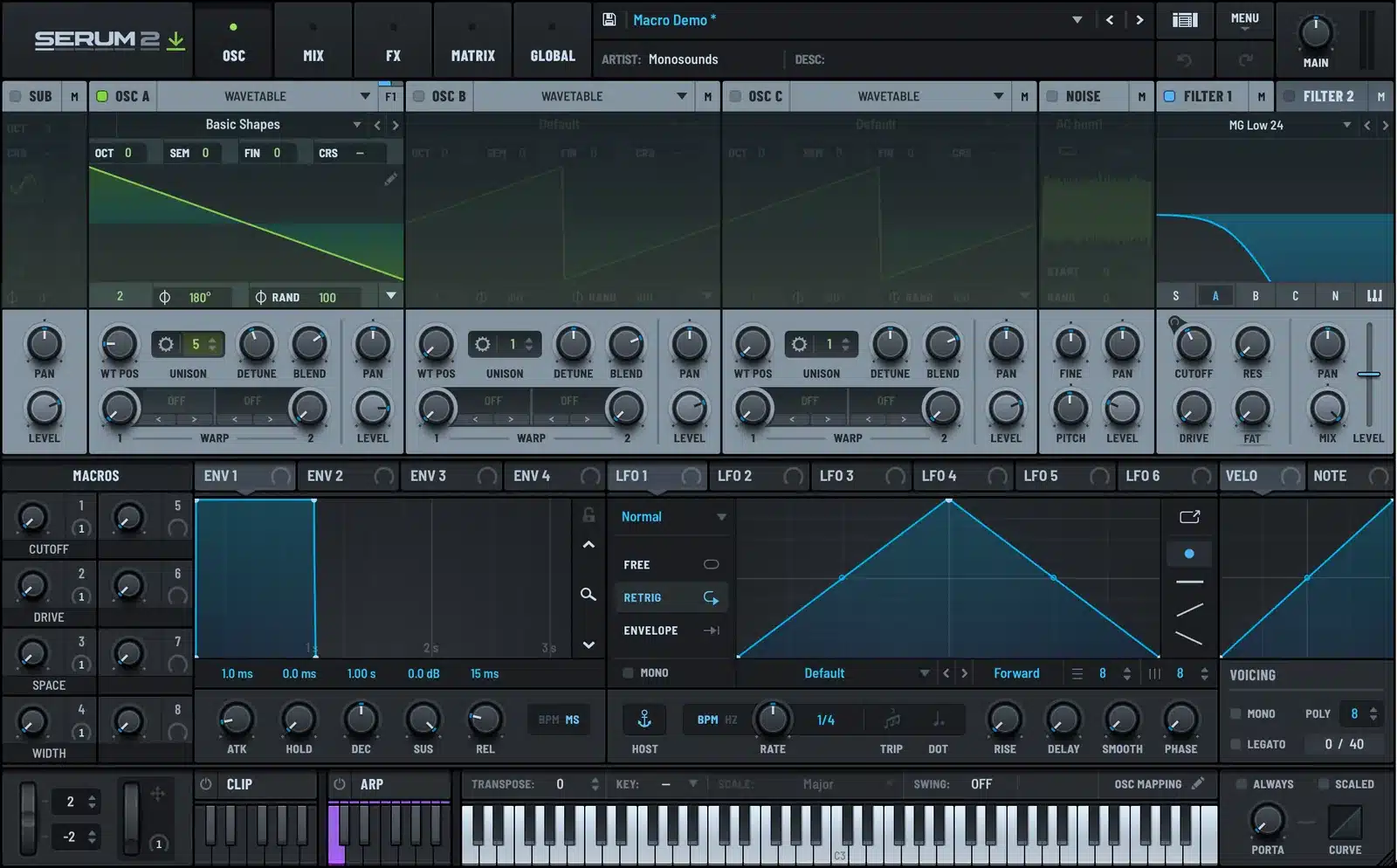
To assign a macro in Serum 2, drag the macro knob onto any parameter and release when the plus sign appears. The mod wheel works the same way: drag the wheel icon at the bottom left of the OSC page onto a knob. Serum 2 has eight macros, and most presets ship with all of them empty, which is a shame, because a macro is the difference between a preset you tweak and a preset you play.
I put macros in every preset I sell. Here is how they work, how I lay them out, and the one habit that makes them useful instead of decorative.
What a Macro Is
A macro is a knob that turns other knobs. Assign it to the filter cutoff and it moves the cutoff. Assign it to cutoff, drive, and reverb mix at once, and one turn changes all three, each by a different amount and even in different directions.
Serum 2 doubled the count from four to eight. They live in the MACROS panel at the bottom left of the OSC page, four visible per column. The small number beside each knob shows how many destinations it has.
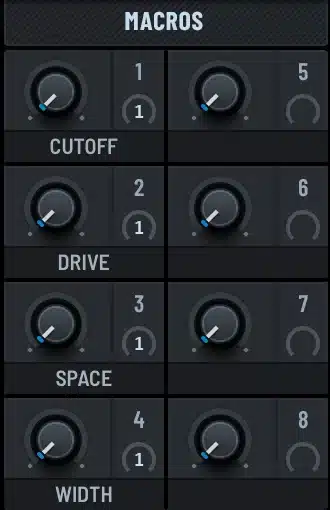
Macros are also a modulation destination. You can have an LFO move a macro, and the macro move five things. That is a cheap way to animate a whole patch with one LFO row.
How to Assign a Macro
Drag the macro knob onto any knob you want it to control. While you drag, a label follows the mouse, and a plus sign appears when the cursor is over something assignable. Release, and the connection is made.
The small ring around the destination knob shows the modulation depth. Drag the ring to change the amount. Drag it below the center to make the macro turn the knob down instead of up.
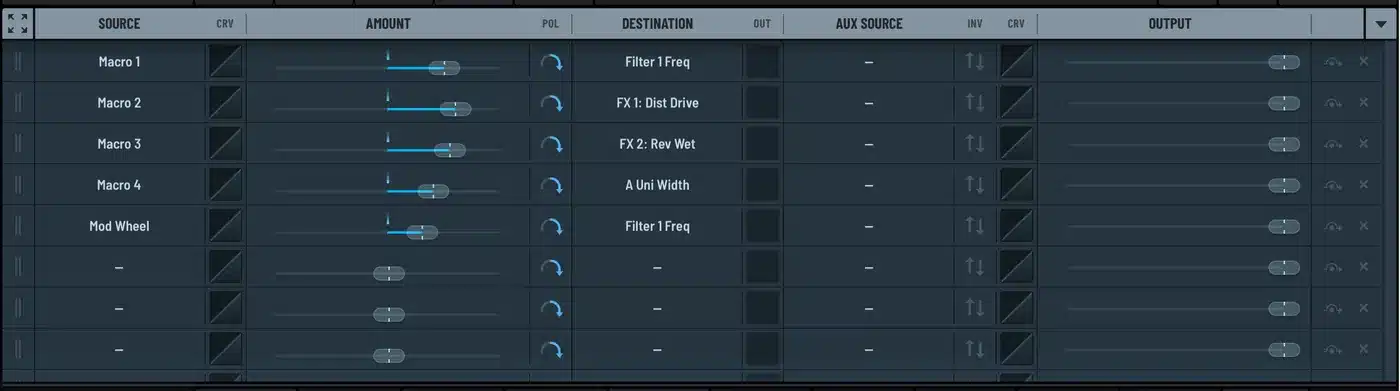
To see everything a macro is connected to, hover over it. A tooltip lists the destinations. To remove a connection, open the MATRIX tab and delete the row, or drag the depth ring back to zero.
All of this shows up as ordinary rows in the mod matrix, which means you can add curves, set bipolar mode, or add an aux source to a macro row just like any other modulation. The Serum 2 modulation guide covers the matrix in detail.
Naming Macros
Double-click the label under a macro and type a name. Do it every time. A macro called MACRO 3 tells the player nothing. A macro called GRIT tells them exactly what will happen before they touch it.
The names are saved with the preset and show up in the browser and in DAWs that read parameter names, so they carry through to automation lanes too.
The Four-Macro Layout I Use
Every preset I make uses the same first four macros, in the same order. People who own one of my packs can pick up any other pack and know what the knobs do without looking.
| Macro | Name | What it moves |
|---|---|---|
| 1 | CUTOFF | Filter 1 frequency, positive, about half depth |
| 2 | DRIVE | Distortion drive up, distortion mix up a little |
| 3 | SPACE | Reverb mix up, delay mix up, sometimes EQ high-pass up so the wet signal stays clean |
| 4 | WIDTH | Unison stereo width on OSC A, chorus mix |
Macros 5 to 8 change per preset. On a bass it might be a sub level. On a pad it is usually a wavetable position sweep or a granular density knob.
Macros and the Mod Wheel
The mod wheel is not a macro, but it behaves like one. Drag the wheel icon at the bottom left of the OSC page onto any knob and it becomes a modulation source. Most of my presets have the wheel on filter cutoff at a modest depth, so a hardware controller has something to do out of the box.
If you want the wheel to drive several things, point it at a macro instead of at the knobs directly. Then one row in the matrix carries the whole gesture.
Controlling Macros From a MIDI Controller
Right-click any macro and choose MIDI Learn, then move a knob on your controller. Serum 2 waits for the first CC it receives and assigns it. The assignment is saved with the preset, and MENU has Save MIDI Map and Load MIDI Map if you want to carry a whole controller layout between presets.
In the DAW, macros appear as automatable parameters. Automating a single macro across a build is much less clutter than automating five separate knobs, and it stays in sync because the relationships are baked into the preset.
The Habit That Makes Macros Worth It
Design the preset, then design the macros, then park the macros at the values that make the preset sound the way it did before you added them. The preset should load sounding right, with the macros somewhere in the middle of their range so there is room to go both ways.
A macro that only sounds good at zero is not a macro. It is a mistake waiting for someone to turn it.
Every preset in the free Serum 2 preset pack uses the CUTOFF, DRIVE, SPACE, WIDTH layout above. Load one, hover the macros, and read the tooltips to see the routings. The full Serum 2 preset catalog follows the same convention, as do the bundles.
FAQ
How many macros does Serum 2 have?
Eight. Serum 1 had four. In the OSC page they are shown in two columns of four in the MACROS panel.
How do I assign a macro in Serum 2?
Drag the macro knob onto the knob you want it to control and release when the plus sign appears. Set the depth with the ring around the destination knob.
Can a macro control multiple parameters?
Yes, as many as you like, each with its own depth and direction. That is the whole point. One turn changes several things by different amounts.
Can I modulate a macro with an LFO?
Yes. Macros are valid destinations as well as sources. Drag an LFO tab onto a macro knob and the LFO now moves everything that macro controls.
Do macro names save with the preset?
Yes. The names are stored in the preset file and appear in the browser, the MACROS panel, and as parameter names in DAWs that support them.

I run Monosounds.studio and make the packs myself. Ten-plus years of producing, 97+ releases, 16,000+ downloads. Every Serum 2 preset we ship passes a CPU check on a mid-range laptop and gets used in a real track before release. If it does not survive a mix, it does not go in the pack.
More about Maxim & the studio →

