Serum 2 does not have an FM engine. It has something better hidden in the warp menu: any oscillator can be frequency-modulated by any other oscillator, the noise, the sub, or either filter. You get FM sounds without leaving the wavetable page.
This is how it works, what the related PD, AM and RM modes do, and three patches that show the range. Screenshots from the plugin at every step.
Where FM Lives
Under each oscillator there are two WARP knobs, each with a dropdown above it. Click the dropdown and you get a menu with Off, Sync, Alt Warp, Filter, Distortion, FM, PD, AM, RM, and Swap Warps. FM is a submenu, and inside it you pick the modulator.
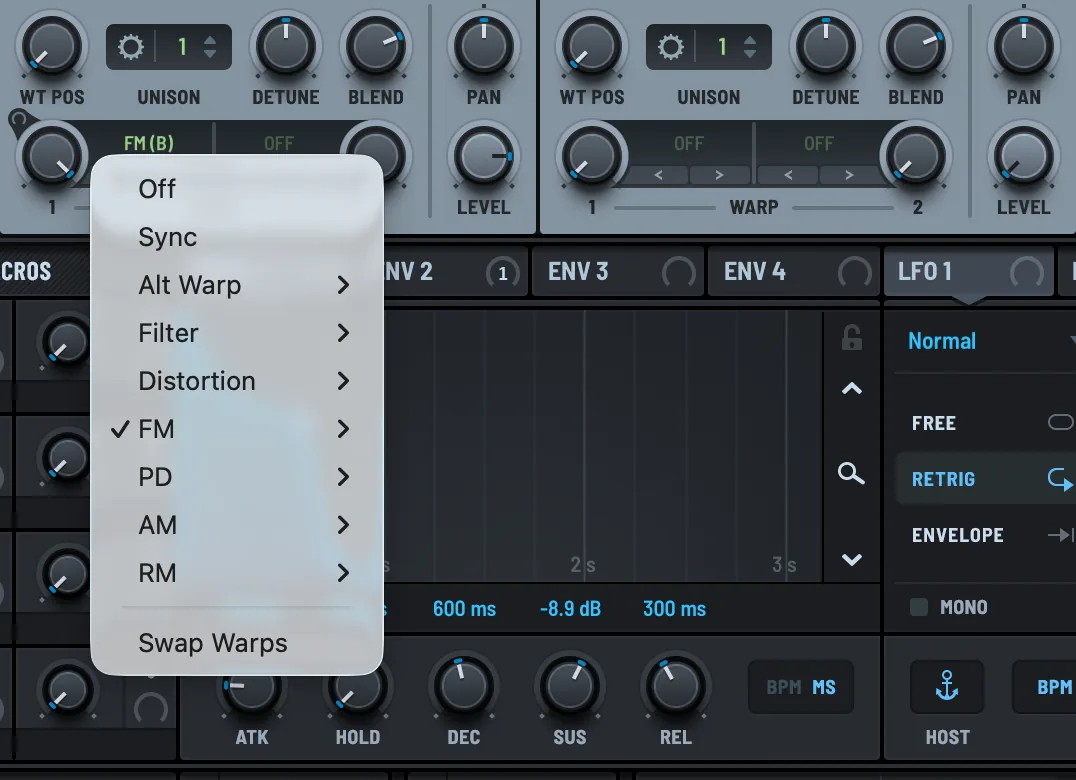
The FM sources are the other two oscillators, the noise oscillator, the sub, and Filter 1 and Filter 2. Filter FM is an unusual one. Feeding the resonant output of a filter back into an oscillator’s pitch gives you screaming, feedback-like tones.
One rule that trips everyone up: the modulator must be enabled. If OSC B is off, FM from B does nothing. Turn OSC B on and pull its LEVEL knob to zero if you only want it as a modulator. You will not hear B, but A will.
The Basic FM Patch
Init the preset. OSC A is a sine, which is the right carrier for clean FM. Turn on OSC B, leave it on a sine too, set its LEVEL to zero and its OCT to +1. Back on OSC A, set WARP 1 to FM with OSC B as the source. The label under the knob reads FM (B).
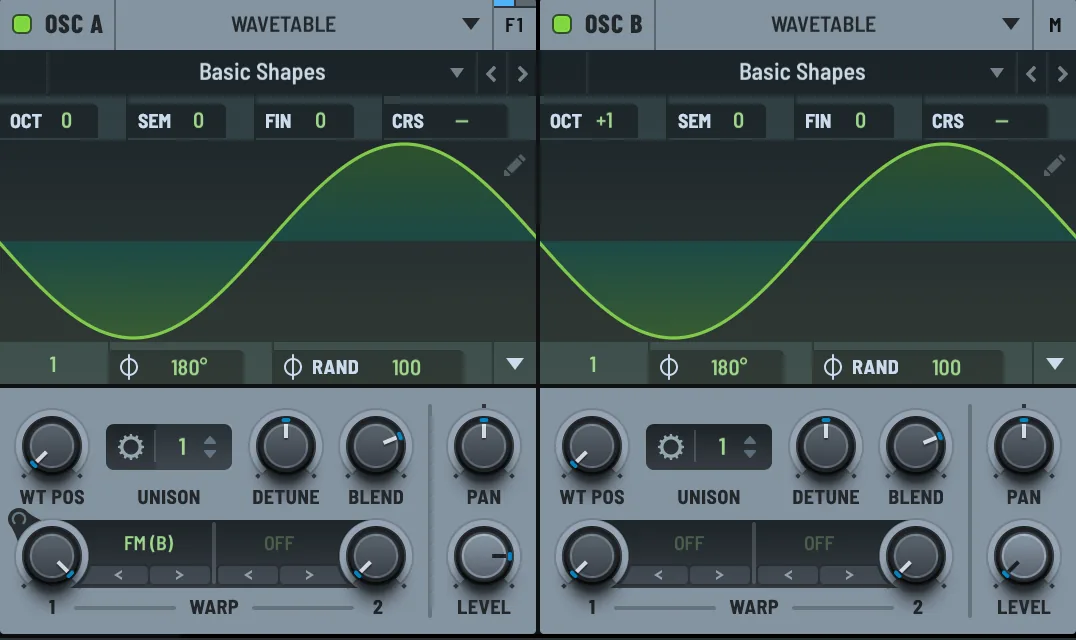
Now turn the WARP 1 knob. At zero you hear a sine. At 20 percent it is an electric piano. At 50 percent it is a bell. Past 70 it is a metallic mess, which is useful for other things.
The pitch ratio between the two oscillators decides the character. OSC B one octave up gives harmonic, bell-like results. Set OSC B to +7 semitones and the harmonics get inharmonic and clangy. Detune B by a few cents and the whole sound starts to beat slowly, which is how DX7 electric pianos got their shimmer.
Adding Movement
Static FM is a tone. FM that changes over the note is an instrument. Drag ENV 2 onto the WARP 1 knob at about 40 percent depth, with a fast attack, half-second decay and zero sustain. Every note now starts bright and metallic and settles into a softer tone. That envelope on the FM amount is the single most important part of any FM patch.
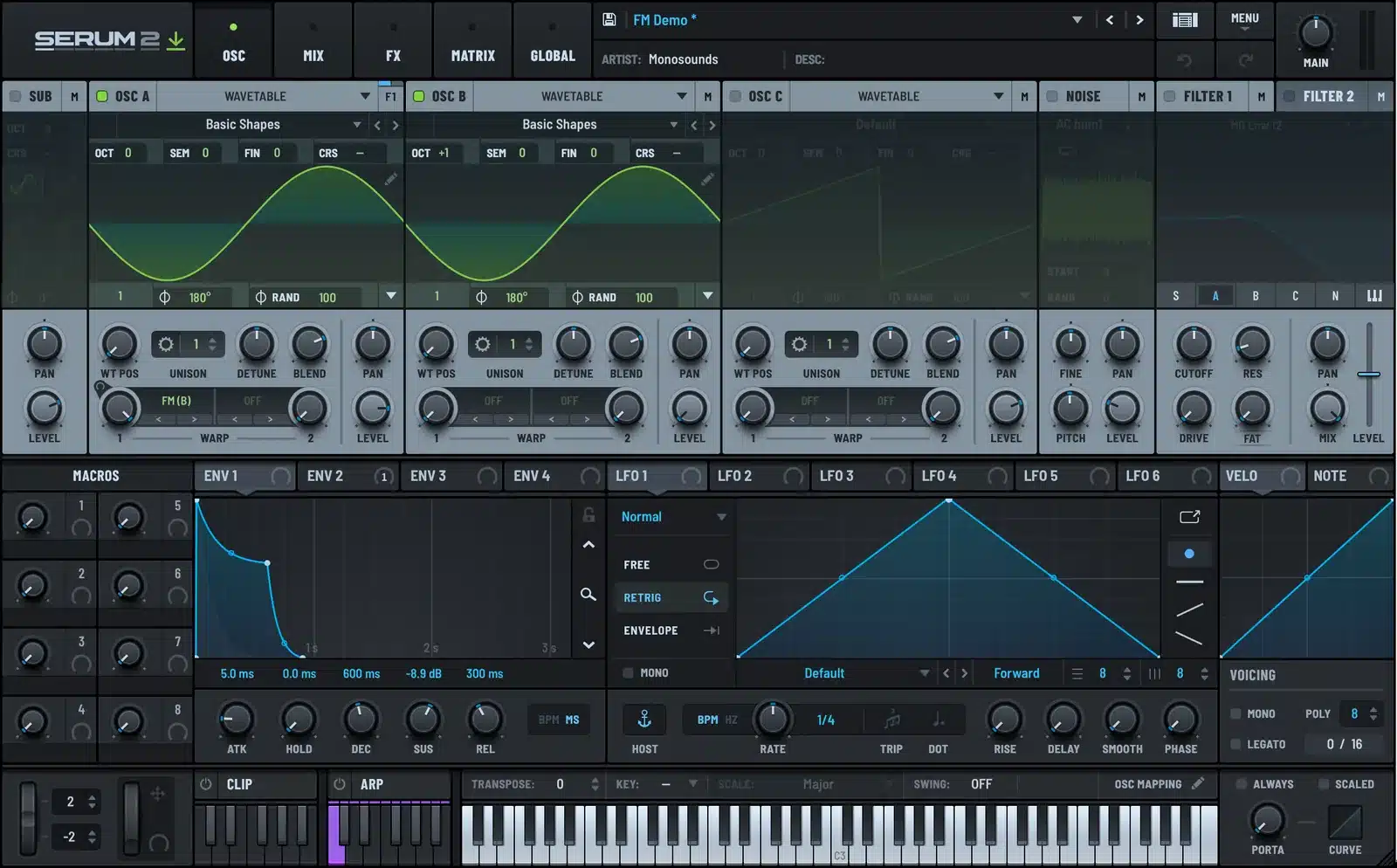
Velocity to WARP 1 at 15 percent is the second most important. Harder notes get more FM, exactly like a real electric piano gets brighter when you hit it harder.
FM, PD, AM, and RM
The four modes next to each other in the menu do related but different things.
| Mode | What it does | Sounds like |
|---|---|---|
| FM | Modulator changes the carrier’s frequency | Bells, e-pianos, metallic leads, growls at high depth |
| PD | Phase distortion, modulator bends the carrier’s phase | Softer, more like a resonant filter sweep, CZ-style |
| AM | Modulator changes the carrier’s amplitude | Tremolo at low rates, sidebands at audio rates |
| RM | Ring modulation, carrier times modulator | Hollow, inharmonic, radio-like |
My rough guide: FM for anything tonal, RM for anything that should sound broken, AM for subtle grit, PD when FM is too harsh.
Thru-Zero FM
The FM options also include Thru-Zero. Normal FM cannot push the carrier’s frequency below zero. When the modulation tries to, the carrier either stops or reflects, which causes a discontinuity. Thru-Zero lets the carrier invert its phase and keep going, so deep FM stays smooth. If a high-depth FM patch sounds like it is tearing, this is the fix.
Three Patches to Copy
Electric piano. Carrier sine, modulator sine one octave up at zero level. WARP 1 FM (B) at 18 percent. ENV 2 to WARP 1 at 35 percent, decay 600 ms. Velocity to WARP 1 at 20 percent. Slow chorus in the FX rack. This is most of what a classic FM piano is, and the electric piano guide goes further.
Bell. Same setup, modulator at +19 semitones instead of +12. WARP 1 at 45 percent. Long amp release, no filter. Add a Plate reverb.
FM bass. Carrier saw instead of sine, modulator sine one octave down. WARP 1 FM (B) at 30 percent with ENV 2 at 50 percent depth and a 150 ms decay. Filter with MG Low 24 after it. The FM adds a snap to the note start that a filter envelope alone cannot make. Compare it with the plain version in how to make a bass in Serum 2.
FM on the Other Engines
The warp menu is per oscillator, not per engine, so a Sample or Granular oscillator can be FM-modulated too. FM on a sampled vocal is a fast way to a robotic texture. FM from the noise oscillator into a wavetable adds a fizz that works on growls and neuro bass.
Several of the keys and bells in the free Serum 2 preset pack are FM patches built with the warp menu. Load one and look at the WARP 1 label on OSC A. The Serum 2 presets catalog has more FM-based keys, and the bundles include the full keys collections.
FAQ
Does Serum 2 have FM synthesis?
Yes, through the warp menu on each oscillator. Choose FM and pick another oscillator, the noise, the sub, or a filter as the modulator. There is no separate FM engine because there does not need to be one.
Why does FM from OSC B do nothing?
OSC B is off. The modulator has to be enabled. Turn it on and set its level to zero if you do not want to hear it directly.
What is the difference between FM and RM in Serum 2?
FM changes the carrier’s frequency and gives tonal, bell-like results. RM multiplies the two signals and gives hollow, inharmonic tones. Both are in the same warp menu.
What is Thru-Zero FM?
A mode that lets the carrier keep oscillating when deep modulation pushes its frequency below zero, instead of stopping or reflecting. It keeps high-depth FM smooth.
Can I FM a sample in Serum 2?
Yes. The warp menu works on every oscillator engine, so a Sample, Multisample, Granular or Spectral oscillator can be the carrier.

I run Monosounds.studio and make the packs myself. Ten-plus years of producing, 97+ releases, 16,000+ downloads. Every Serum 2 preset we ship passes a CPU check on a mid-range laptop and gets used in a real track before release. If it does not survive a mix, it does not go in the pack.
More about Maxim & the studio →

