A synth bass is the first thing most people try to build in Serum 2, and the first thing they give up on. The patch ends up thin, or muddy, or it sounds fine on headphones and vanishes on a club system.
I make bass presets for a living, so I have built this patch hundreds of times. Below is the exact four-step version I teach, with a screenshot of Serum 2 at every step so you can match what you see on your own screen.
Total time: about ten minutes. You need Serum 2 and nothing else.
Step 1: Start From Init and Pick the Waveform
Open Serum 2, click MENU in the top right and choose Init Preset. You get one oscillator, OSC A, playing a sine from the Basic Shapes table.
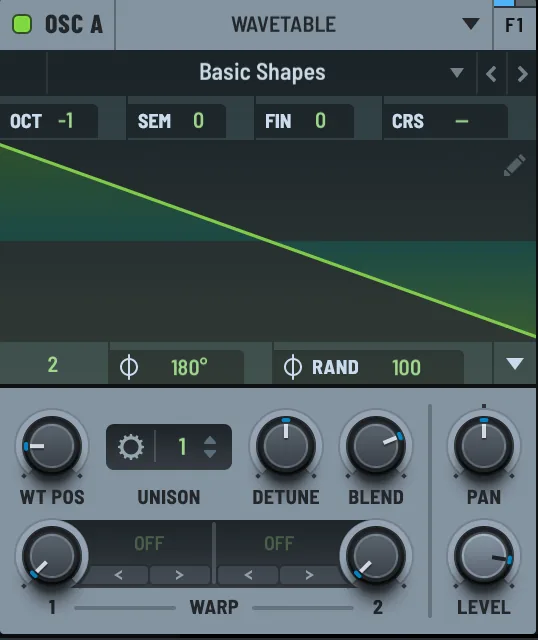
A sine is a fine sub, but it has no harmonics for a filter to work with. Drag the WT POS knob to frame 2. That is the saw in Basic Shapes, and a saw is the right starting point for almost any bass because it contains every harmonic.
Now set OCT to -1. Bass lives an octave below where you would play a lead. If your keyboard is small, this saves you from running out of low keys.
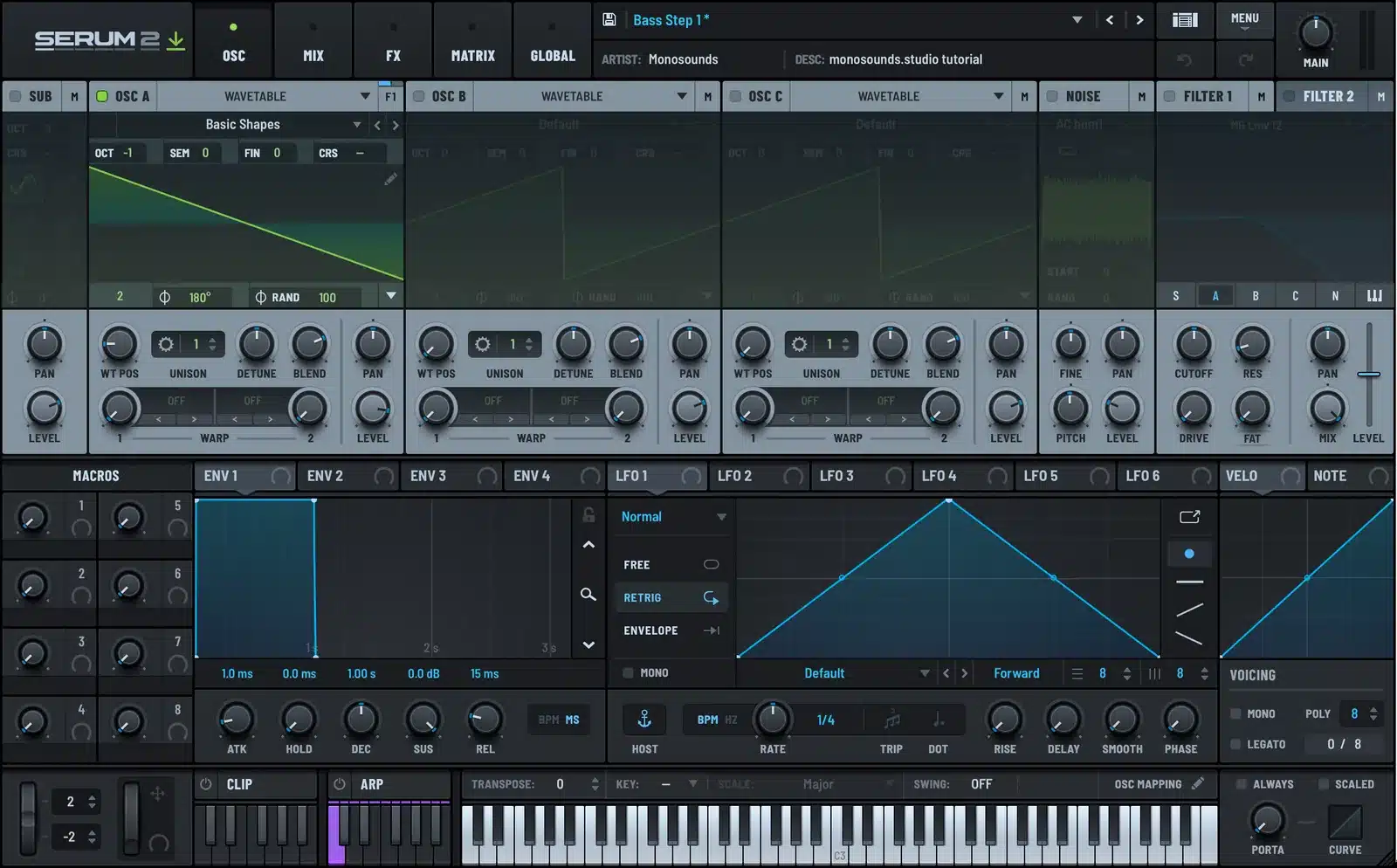
Play a low C. It is loud and buzzy, and that is exactly what you want at this stage. Everything from here on is about taming it.
Step 2: Add a Sub and a Filter
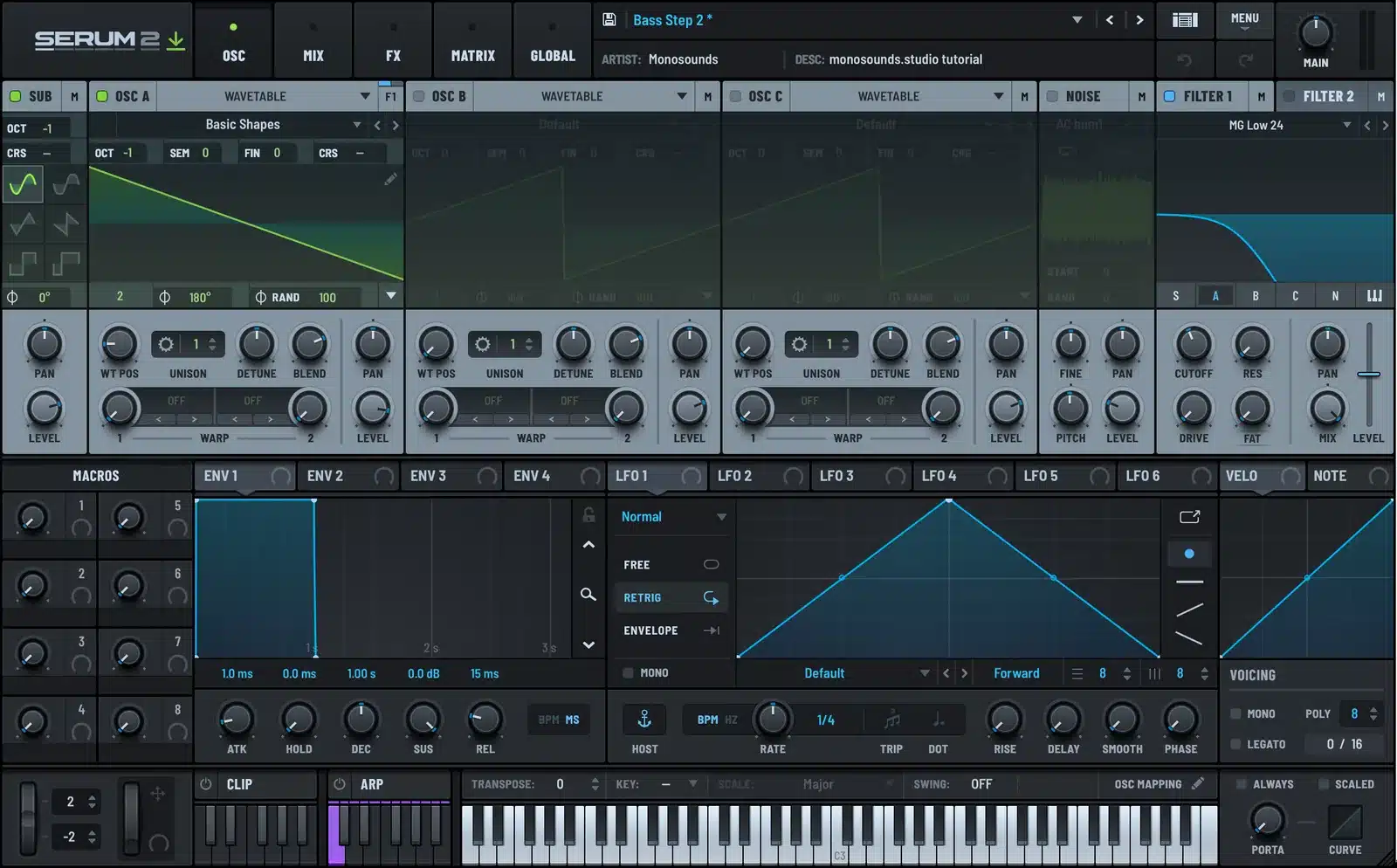
Turn on the SUB oscillator by clicking its header on the far left. Leave it on a sine and set its octave to -1 as well. The sub gives you a clean fundamental that stays solid no matter what you do to OSC A later.
By default the sub routes straight to the output, past the filters. Keep it that way. Filtering the sub only makes it quieter.
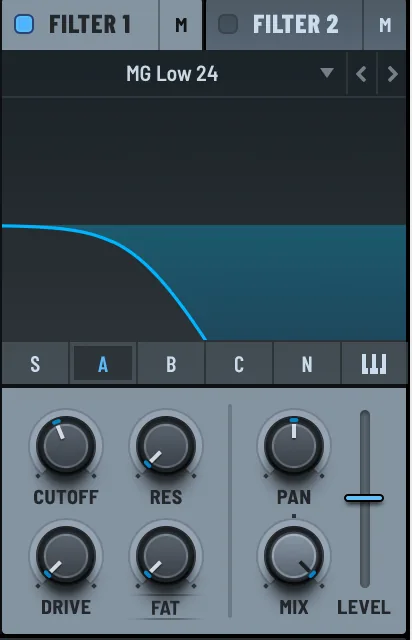
Next, enable FILTER 1. Serum 2 defaults to MG Low 12, a Moog-style ladder. I switch it to MG Low 24 for bass because the steeper slope cleans up the top end faster. Pull CUTOFF down to around 40 percent and add a touch of RES, about 15 to 20 percent.
Check that OSC A is actually going through the filter. In the filter panel there is a row of buttons labeled S, A, B, C, N. A should be lit. If it is not, click it.
Play the note again. The buzz is gone and the low end is doing the work. It is a bass now, just a static one.
Step 3: Shape It With Envelopes
This is the step that separates a preset from a raw waveform. Two envelopes, two jobs.
ENV 1 is the amp envelope. It is always wired to the output level. For a bass I set ATK to 2 ms, DEC around 350 ms, SUS to about -5 dB and REL to 120 ms. Short release matters. A long tail on a bass smears into the next note and eats headroom.
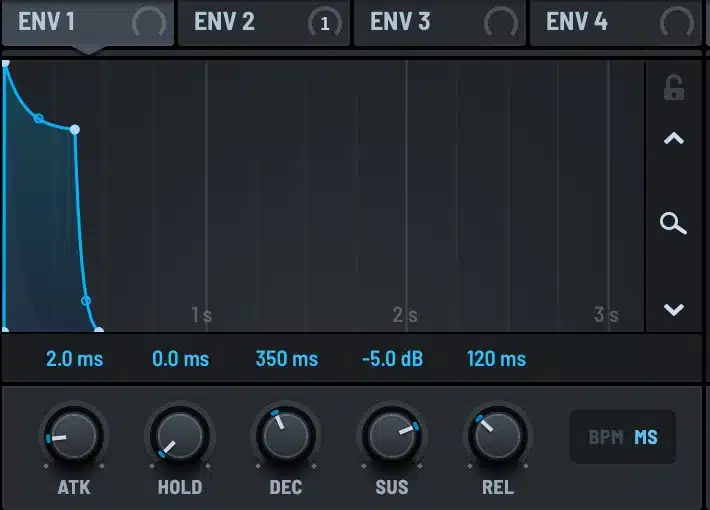
ENV 2 is going to open the filter at the start of every note. Click the ENV 2 tab, set ATK to 1 ms, DEC around 220 ms, SUS to zero and REL to 150 ms. Then drag the ENV 2 tab onto the CUTOFF knob in FILTER 1. The cursor shows a plus sign when it is over a valid target. Let go and the connection is made.
Drag the small ring around CUTOFF to set the depth. I use about 30 percent. Now every note starts bright and darkens within a fifth of a second. That is the pluck you hear on every good house and techno bass.
I also drag VELO onto CUTOFF at around 10 percent depth. Harder notes open the filter a bit more, which keeps a repeated bassline from sounding like a machine gun.
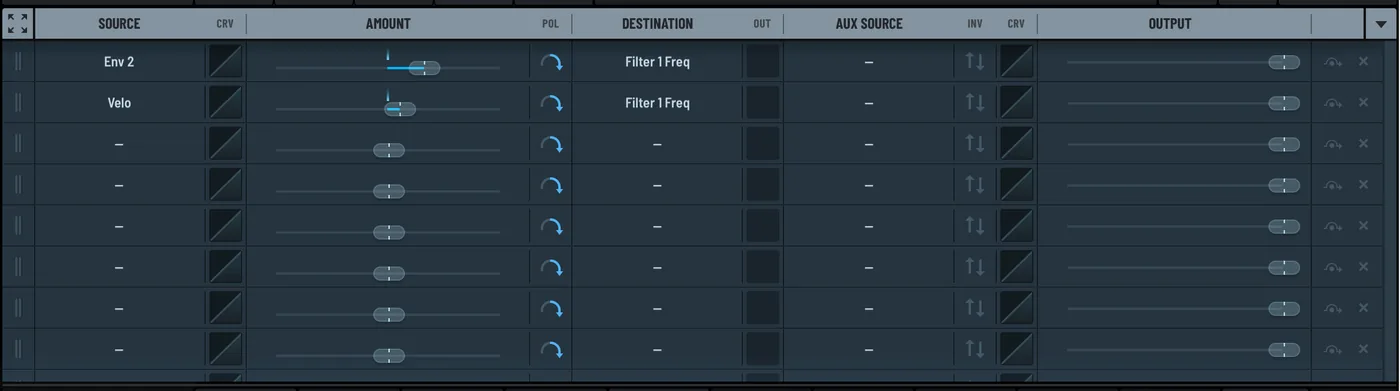
If you want the full story on how the matrix works, I wrote a separate Serum 2 modulation guide. For this patch, two rows is all you need.
Step 4: Add Weight With FX
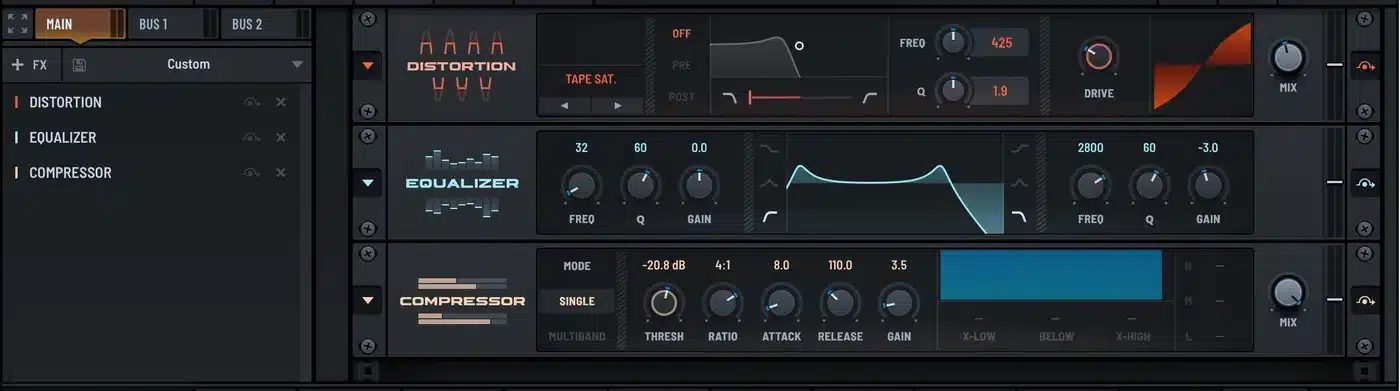
Click the FX tab. Three effects, in this order.
Distortion first. Set the mode to Tape Sat, drive around 28 and mix at 45 percent. Tape saturation adds harmonics above the fundamental, which is what lets a bass show up on laptop speakers and phones. Push it too far and the sub gets fuzzy, so keep the mix under half.
Equalizer second. Band 1 is a high-pass at 32 Hz to clear out rumble your speakers cannot reproduce anyway. Band 2 is a gentle cut of 3 dB around 2.8 kHz, which is where saturation tends to get harsh.
Compressor last. Threshold around -20 dB, ratio 4:1, attack 8 ms, release 110 ms, a bit of makeup gain. The compressor evens out the notes so the bassline sits at one level in the mix.
Play the note one more time. Compare it with Step 1. Same oscillator, same note, completely different instrument.
The Settings on One Page
| Section | Setting | Value |
|---|---|---|
| OSC A | Table / WT POS / OCT | Basic Shapes / frame 2 (saw) / -1 |
| SUB | Shape / OCT | Sine / -1, routed direct |
| FILTER 1 | Type / Cutoff / Res | MG Low 24 / 40% / 18% |
| ENV 1 | A / D / S / R | 2 ms / 350 ms / -5 dB / 120 ms |
| ENV 2 to Cutoff | A / D / S / R / depth | 1 ms / 220 ms / 0 / 150 ms / 30% |
| FX | Chain | Tape Sat 45% mix, EQ HPF 32 Hz, Comp 4:1 |
Mistakes I See All the Time
Unison on the sub. Detuned voices below 100 Hz cancel each other and the low end turns to mush. Keep the sub at one voice. If you want width, put it on OSC A and high-pass the wide part.
Reverb on the bass. A reverb tail under a bass fills the space the kick needs. If you must, send the bass to a reverb bus and high-pass the return at 200 Hz.
Too much resonance. Resonance above 30 percent on a ladder filter makes the fundamental drop. That is why your bass sounds louder with the resonance knob at zero.
Skipping the envelope on the filter. A static cutoff is why beginner basses sound like a test tone. The ENV 2 routing in Step 3 is the single biggest upgrade in this whole tutorial.
I collected more of these in Serum 2 beginner mistakes if you want the full list.
Where to Go From Here
This patch is a template. Swap the saw for a square and you get a rounder, more 80s bass. Push the distortion mix to 80 percent and add a second filter in the FX rack and you are in Reese territory, which I cover in the Reese bass tutorial. Drop the filter cutoff to 25 percent, take out the distortion, and it turns into an 808-style bass.
If you would rather start from finished patches and reverse-engineer them, the free Serum 2 preset pack has several basses built exactly this way. Open one, click the MATRIX tab, and you will recognize every routing from this article. The full catalog of Serum 2 presets is sorted by genre if you need something specific, and the preset bundles are the cheapest way to get a lot of basses at once.
FAQ
What is the best waveform for a bass in Serum 2?
A saw for anything that needs to cut through, a square for rounder retro tones, and a sine for pure sub. Most of my presets combine a saw on OSC A with a sine sub.
Which Serum 2 filter is best for bass?
MG Low 24 is my default. The Moog-style ladder has a musical resonance and a steep slope that cleans up the top quickly. Try Ladder Acid if you want a more aggressive, squelchy character.
Why does my Serum 2 bass sound thin?
Usually one of three things: no sub oscillator, unison detune on the low end, or a high-pass in the FX chain set too high. Solo the sub, make sure it is at one voice, and check the EQ.
Should I use mono mode for bass?
Yes, for most basslines. Turn on MONO in the VOICING panel so notes cannot overlap. Add LEGATO and a little portamento if you want slides between notes.
How loud should the bass preset be?
Aim for peaks around -6 dBFS out of Serum 2. That leaves room for mixing. Use the MAIN knob in the top right to set it, not the oscillator levels.

I run Monosounds.studio and make the packs myself. Ten-plus years of producing, 97+ releases, 16,000+ downloads. Every Serum 2 preset we ship passes a CPU check on a mid-range laptop and gets used in a real track before release. If it does not survive a mix, it does not go in the pack.
More about Maxim & the studio →

