Three Serum 2 patches will carry an entire ambient track: a pair of drones plus one texture, everything feeding a massive reverb. No drums. No bassline. No arrangement view stuffed with clips. And that’s not settling for less. Most of the ambient records I care about were made with even fewer ingredients.
Where the real effort goes is movement. A drone that never changes is just a test tone. Below is how I build mine so they wander by themselves.
The core recipe: two drones, one texture
The first drone is your foundation. Low, warm, heavily filtered; its job is holding the key of the piece. The second one lives a fifth or an octave higher, carries more brightness, and handles most of the slow motion. Then comes the texture, which is where things get interesting: grainy, unpitched or only vaguely pitched, buried in the mix yet responsible for most of the atmosphere.
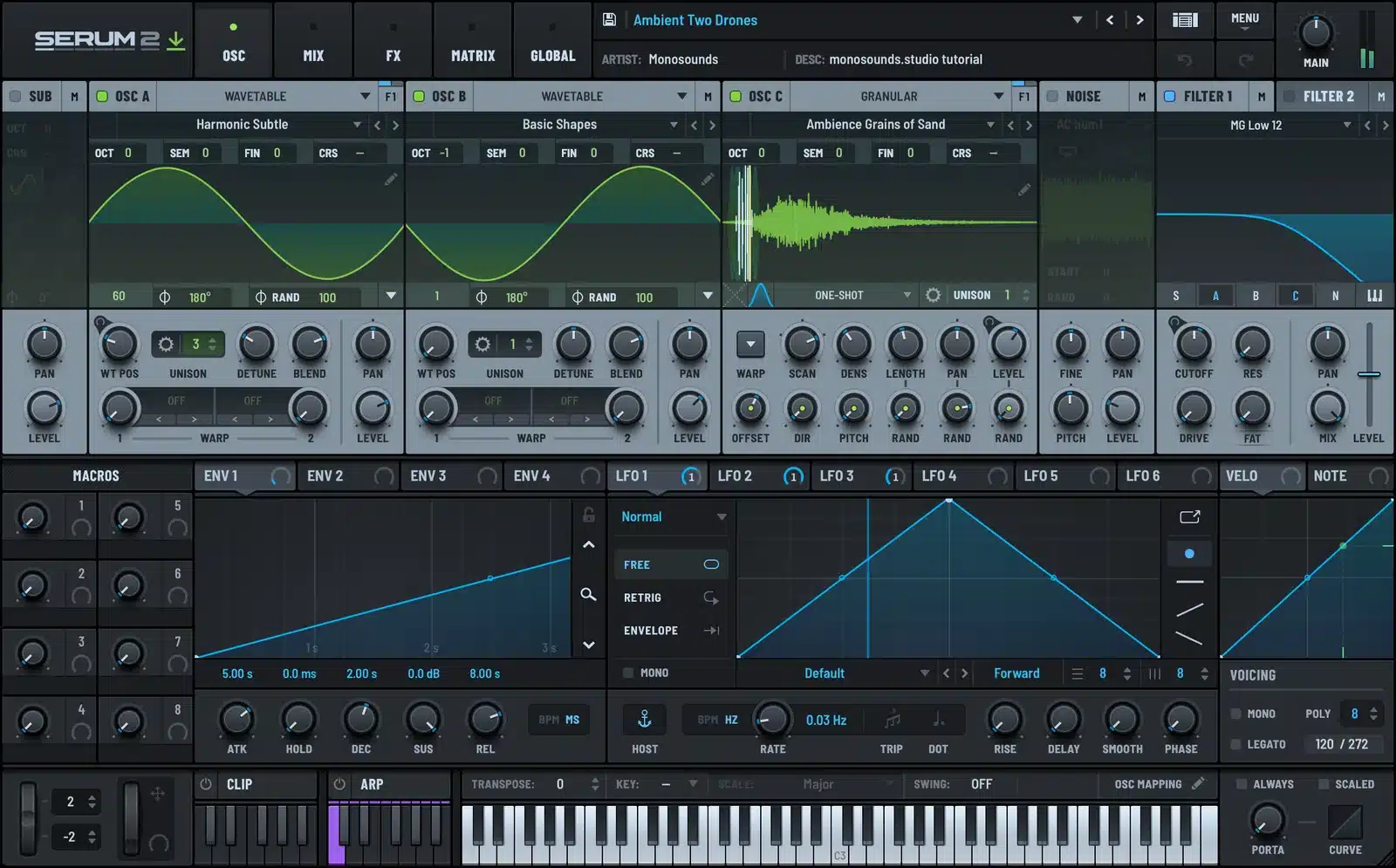
Deliberately spread them across different registers. Two drones parked in the same octave will mask each other until the whole mix turns to fog. Fog is fine, but only when it’s a choice.
Envelopes: slower than feels reasonable
Want Serum 2 to sound ambient immediately? Start with the amp envelope. Attack at 2–4 seconds, release at 5–8 seconds. Suddenly every chord change is a crossfade rather than an event.
Two details worth getting right:
- Those long releases pile up voices. Play a chord, move to the next one, and both keep ringing for several seconds. So budget your polyphony and stay away from thick voicings; two or three notes does the job.
- The filter deserves its own envelope, set even slower than the amp’s. Brightness landing a beat behind loudness makes the sound feel like it’s breathing.
The generative LFO trick
If I taught lessons, this is the bit I’d put behind a paywall. Grab two LFOs and set both extremely slow (a full cycle every 15–30 seconds) while making sure the rates aren’t clean multiples of one another. Something like 0.07 Hz against 0.05 Hz.
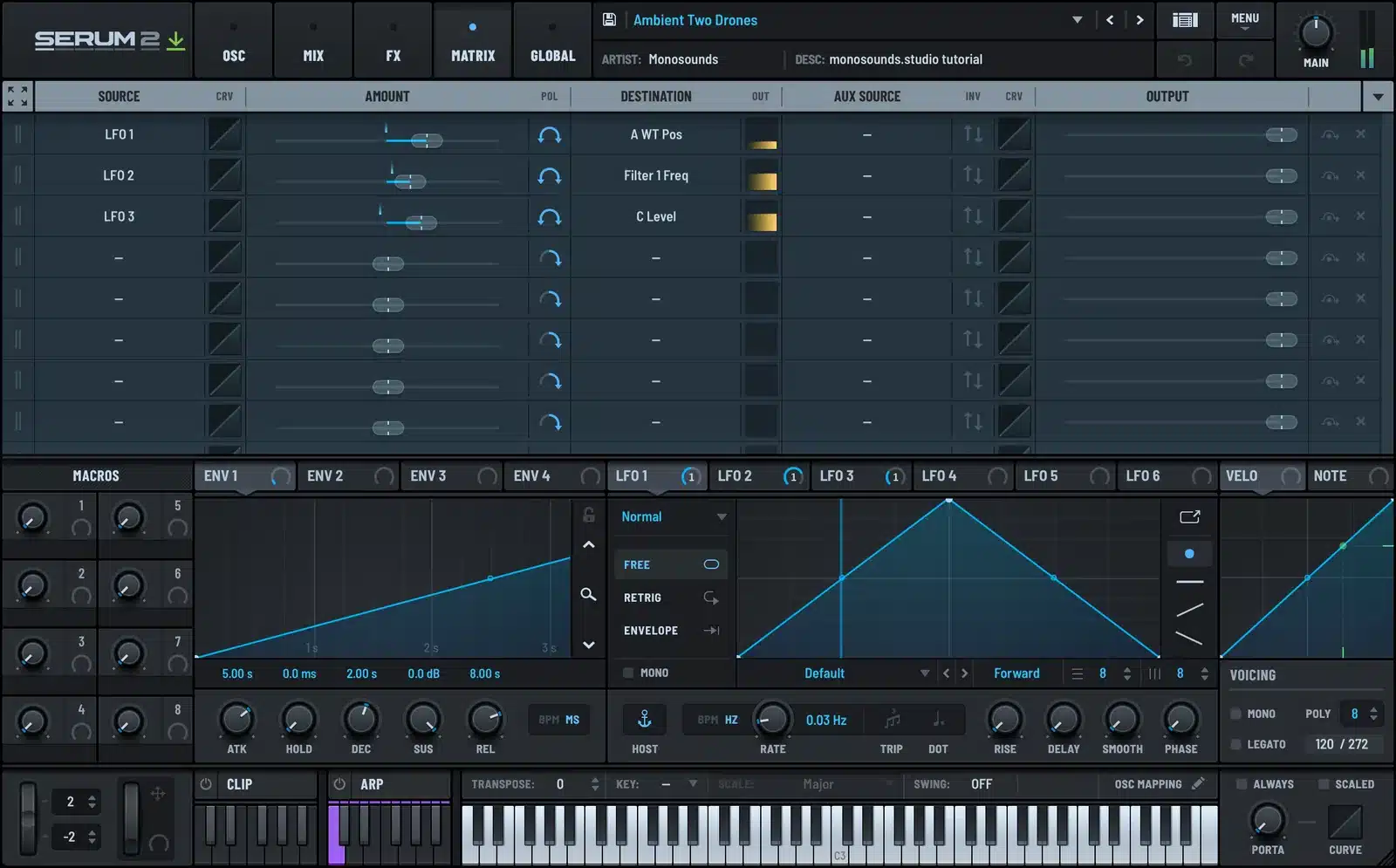
Send one to wavetable position, the other to filter cutoff. Since the cycles never realign, the patch never plays the same moment twice. Hold a single note and the sound keeps discovering fresh combinations for minutes on end. That’s your generative feel, bought with exactly two modulation slots.
Feel free to sneak in a third: a slow LFO on fine pitch at a depth of just a few cents. It imitates old-hardware drift and keeps the drone from sounding frozen solid.
Textures: where the granular oscillator earns its place
My texture layer usually comes from Serum 2’s granular oscillator loaded with any long sample: a field recording, a sung phrase, even a chord I bounced earlier. Slow down the grain playback, let grains overlap generously, then scan across the sample using yet another of those crawling LFOs.
Recognizing the source material isn’t the goal. What you’re after is small, irregular detail, the stuff pure wavetables simply can’t produce. There’s a dedicated granular tutorial on the site if grain settings are something you want to dig into.
This demo, from one of our melodic packs, shows the kind of wide, emotional pad territory all this opens up.
The reverb: one big space, shared
Resist giving every patch its own reverb. Build a single send with a long tail (8 seconds minimum) and route all three layers into it at varying levels. One shared space is exactly what fuses separate synth parts into a single room.
Two settings almost everyone skips: cut the reverb’s lows around 200–300 Hz so the tail can’t swallow your root drone, and shave a bit off the reverb’s top end so it settles behind the dry signal rather than sitting on top of it.
Prefer starting from patches that already work? Download our free Serum 2 presets and stretch the envelopes: two knob moves turn a pad into a drone.
Arranging long-form without a grid
- Skip drawing clips; record each layer live for 4–6 minutes instead, riding the mod wheel or a macro as you go.
- One change at a time. A new chord, or a new texture, or the filter opening; never everything simultaneously.
- Think in scenes of 60–90 seconds rather than 8-bar loops. If the DAW grid keeps dragging you back, set an actual timer.
- Finish by taking things away. The root drone gets muted last, and the reverb tail becomes your outro.
For drone design at the single-patch level — sounds that hold up entirely on their own — I went further in my ambient drones guide. And should ambient become your main thing, the Serum 2 preset bundles are the cheapest route to stocking up on pads and textures from several of our packs in one go.
FAQ
Do I need drums in ambient music?
No. When you want a pulse, automate a slow filter or put a rhythmic LFO on volume. A pulse you sense but can’t quite count beats a kick drum here.
What tempo should an ambient track be?
Largely beside the point, since nothing gets quantized hard. I still dial in 60–70 BPM so that synced LFOs and delays land in musical relationships.
Why does my drone sound static?
Nine times out of ten it’s a single LFO doing all the work, locked to the grid. Unsync it, slow it right down, then bring in a second LFO running at an unrelated rate.
Is Serum 2 enough for a whole ambient track?
Yes. With wavetable, granular and sample oscillators plus the onboard FX, three instances comfortably handle drone, texture and melody. And if designing all three yourself doesn’t appeal, the full Serum 2 preset catalog contains plenty of pad and texture patches that already move on their own.
One chord, three patches, a five-minute timer — that’s your starting point. When the sound keeps evolving without your help, the track mostly writes itself. Your main job is staying out of its way.

I run Monosounds.studio and make the packs myself. Ten-plus years of producing, 97+ releases, 16,000+ downloads. Every Serum 2 preset we ship passes a CPU check on a mid-range laptop and gets used in a real track before release. If it does not survive a mix, it does not go in the pack.
More about Maxim & the studio →

