A drone is a single held note that somehow never gets old. It hangs there for a minute, sometimes longer, and there’s always motion buried inside it, slow enough that your ear can’t pin down exactly what’s changing. Serum 2 turned out to be genuinely strong at this, and most of the credit goes to the granular oscillator.
This is my process for drones and ambient beds, starting at the oscillator. Everything happens inside Serum 2, no third-party plugins required.
Start with granular, not a saw
Sure, a plain wavetable can drone. But if you want something that feels alive quickly, the granular oscillator is the shortcut. Throw any sample at it — one sung note, a bowed cymbal, a single piano chord — and suddenly you have raw material to work with.
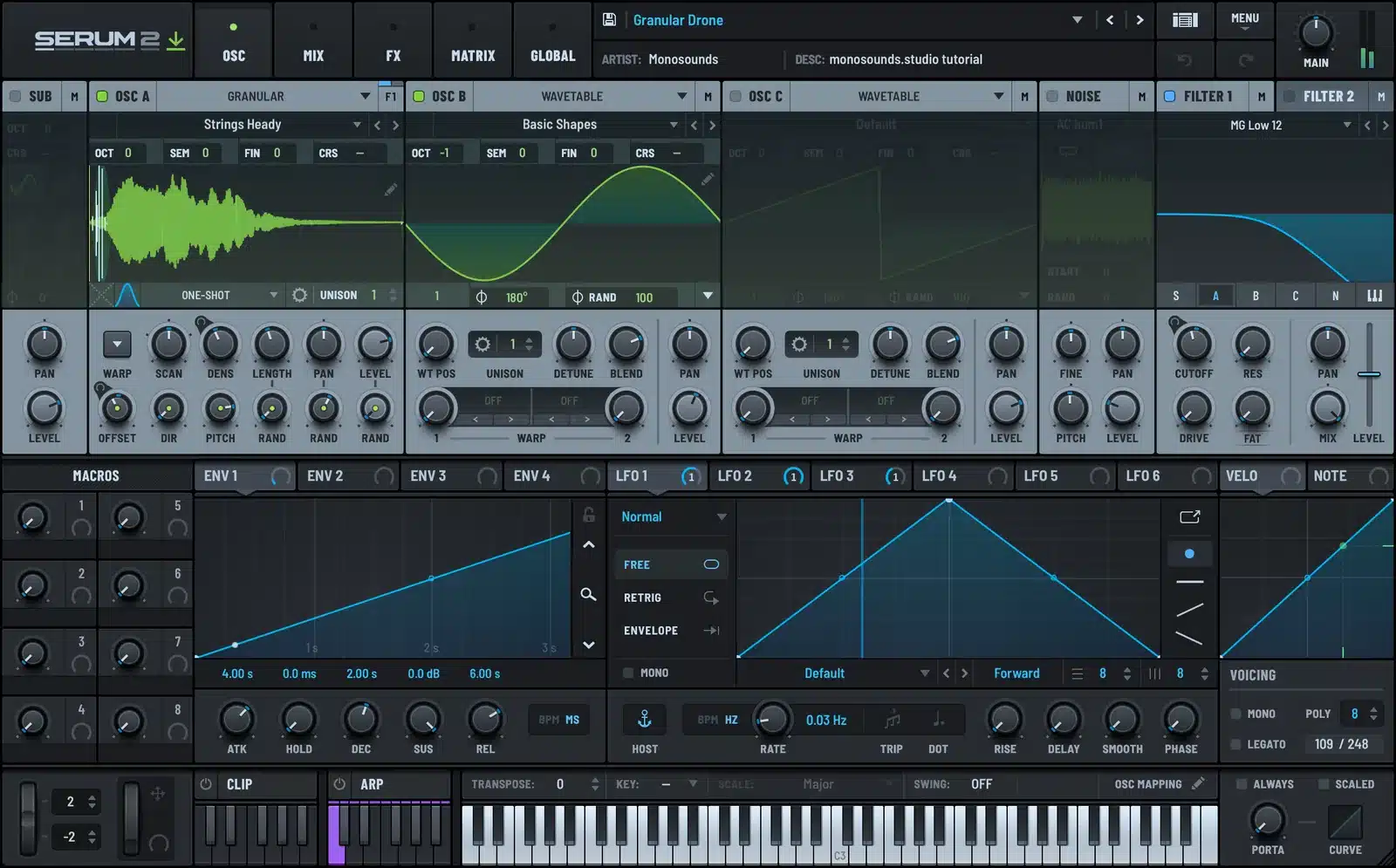
Most of the heavy lifting comes down to three settings:
- Grain size. Long grains blur the source into a wash. Short ones get gritty and almost rhythmic. Drones want long.
- Position. Sit it on the sustained portion of the sample, then let a very slow LFO push it a few percent back and forth.
- Density. The more grains overlap, the smoother the cloud gets. For drones, run density high.
The mistake I see constantly is a static grain position. It ends up sounding like a looped sample because that’s literally what it is. A tiny, slow drift is all it takes to fix. There’s a lot more on grain settings in the granular oscillator tutorial.
Envelopes: slower than feels right
Take whatever attack time feels slow to you and double it. My go-to drone envelope looks like this: 3–5 second attack, sustain all the way up, release at 8–10 seconds.
Honestly, the release is the important half. With release longer than attack, each chord change bleeds into the next one, and that overlap is harmonic movement you get for free. Nobody programmed it. It just shows up between notes.
One detail that trips people up: set polyphony high enough that those long tails survive. When a voice gets stolen mid-release you get a nasty little dropout, and it’s a pain to track down because it only appears once you start playing busier passages.
Slow LFOs on everything
Modulation is what separates a drone from a held note. My rules:
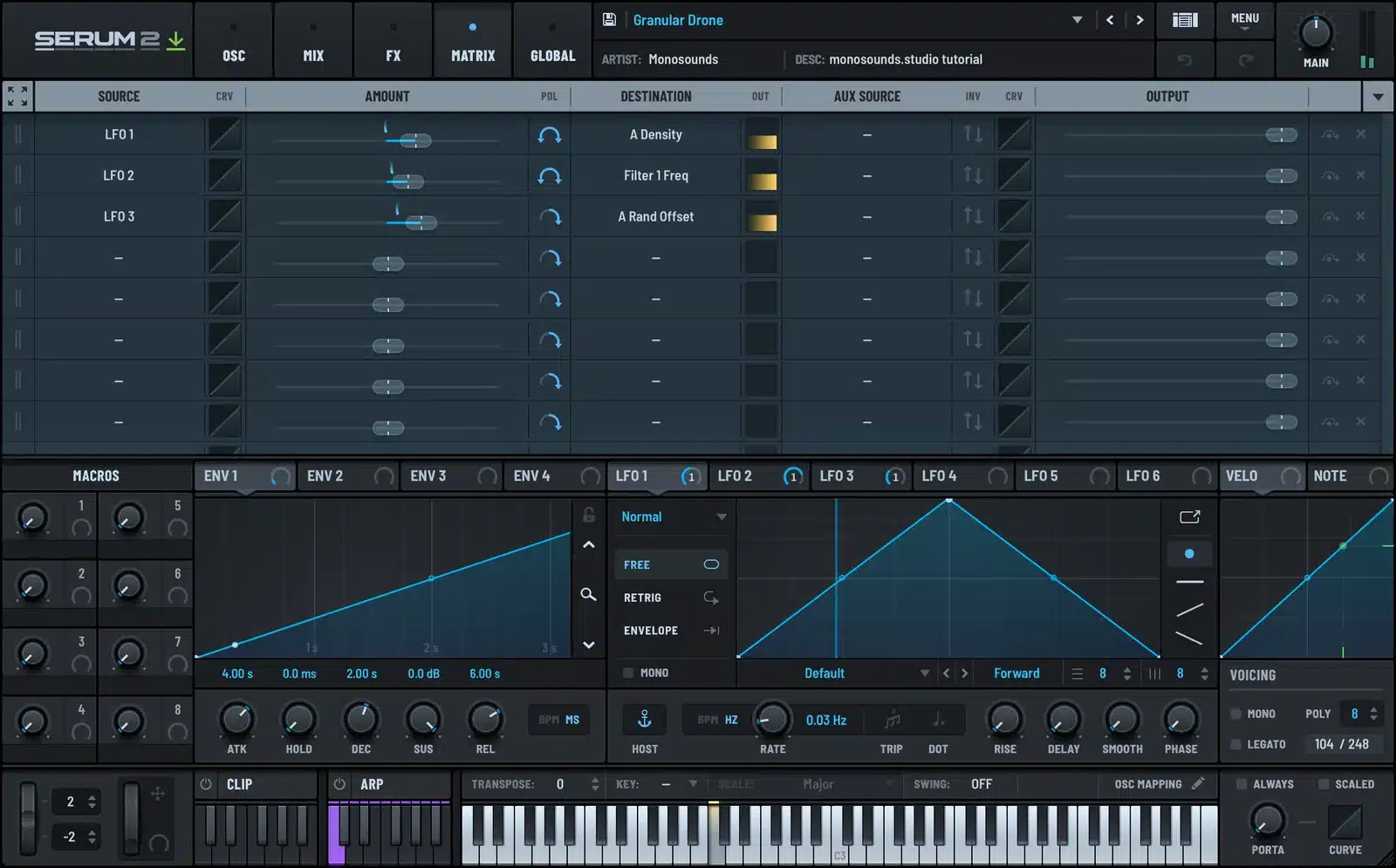
- Take the LFOs off tempo sync. A drone has no rhythm to sync to. Mine sit around 0.05–0.1 Hz, so a full cycle takes 10–20 seconds.
- Never let two LFOs share a rate. Run them at close-but-different speeds and they drift in and out of phase, which means the combined motion takes minutes before it repeats. That’s where the “never the same twice” quality comes from, and it’s free.
- Where to point them: grain position, filter cutoff, wavetable position on a second oscillator, and the pan of one layer. Keep depths modest; 10–20% does the job.
Prefer taking things apart to building them? Download the free Serum 2 presets and dissect the pad patches. Start with the mod matrix, not the oscillators.
Think like a reverb freeze
Ambient treats reverb as half the instrument rather than a mixing tool. Inside Serum 2’s FX chain I do two things:
- Stick an EQ in front of the reverb and cut below roughly 200 Hz on the way in. Low frequencies turn long tails into sludge. Kill them at the door and the tail stays clear even with the size cranked.
- Raise size and mix until the dry signal nearly vanishes, then pull back about 10%. Around 50–70% mix, the patch stops reading as a synth note and starts reading as a space.
Want the endless “freeze” sound? Resample. Print eight bars of the droning patch to audio, then drop that audio back into Serum 2’s sample or granular oscillator. The reverb tail is now your oscillator. Half the ambient textures I’ve ever shipped in packs came from this one move.
Layer two drones, not one
A single patch almost never fills the spectrum properly. So I stack two:
- A dark low-mid layer: filtered, narrow, sitting somewhere between 100 and 800 Hz.
- An airy top layer: highpassed near 400 Hz, wide in stereo, and mixed quieter than instinct says.
Only the top layer gets width. Make both layers wide and the drone folds up strangely in mono while picking fights with everything else in the arrangement. There are more voicing ideas along these lines in the pads and atmospheres guide.
This is the kind of wide, sustained top layer I’m talking about. The demo is future bass, but the pad vocabulary is exactly the same:
Keep the low end honest
Drones swallow headroom without announcing it. Unless the drone is literally your bassline, highpass the whole patch around 90–100 Hz. Solo’d, you won’t notice the cut. Your kick and bass absolutely will.
If ambient material becomes a regular thing for you, the Serum 2 preset bundles are the cheapest way to load up on pad and texture patches worth gutting and rebuilding, which is honestly the quickest way to learn from them.
FAQ
Do I need long samples for granular drones?
Nope. A two-second sample is fine, since the grains just cycle over it. What actually matters is that the source is tonal and fairly clean.
Why does my drone sound static?
Nine times out of ten: nothing is modulating grain or wavetable position, and the LFOs are tempo-synced so they repeat every bar. Unsync them, then slow them down dramatically.
How many voices should a drone patch have?
As many as it takes for long releases to never get chopped. I go with 8 polyphony or higher. If the CPU starts complaining, trim the release before you cut voices.
Can I do this without the granular oscillator?
You can. Two detuned wavetable oscillators with slow position modulation cover about 80% of it; granular just supplies texture that’s tough to fake otherwise. A good chunk of the pad patches across the whole Serum 2 preset library are built precisely that way, no granular oscillator in sight.
Drones reward patience. Finish the patch, hold a single chord for two full minutes, and just listen to the LFOs work. If you find yourself waiting for the loop point and it never arrives, you nailed it.

I run Monosounds.studio and make the packs myself. Ten-plus years of producing, 97+ releases, 16,000+ downloads. Every Serum 2 preset we ship passes a CPU check on a mid-range laptop and gets used in a real track before release. If it does not survive a mix, it does not go in the pack.
More about Maxim & the studio →

