The MIX tab is new in Serum 2 and it is the tab I open most after OSC. Every sound source in the patch gets a fader, a pan, a routing menu and two bus sends. When a preset sounds muddy or one layer is too loud, this is where you find out why in five seconds.
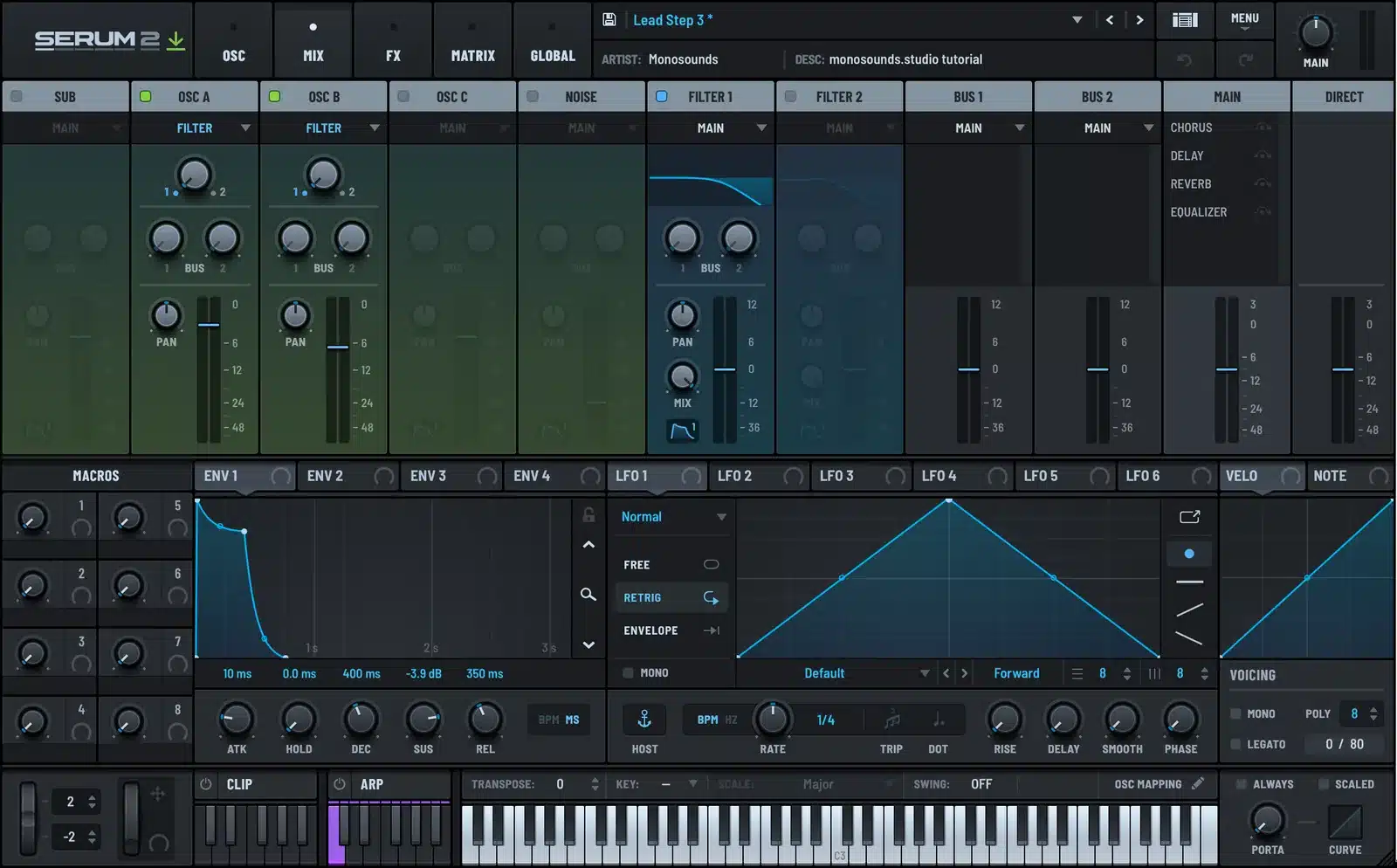
Here is what every part of it does, with a screenshot of a real patch.
The Layout
Click MIX at the top. From left to right: SUB, OSC A, OSC B, OSC C, NOISE, FILTER 1, FILTER 2, BUS 1, BUS 2, MAIN and DIRECT. Only the channels you have enabled are lit. Click a channel header to enable it, and it turns on everywhere in Serum 2, not only in the mixer.

The full page also shows the modulation panels underneath, so you can drag an LFO or envelope onto a channel level or pan without leaving the tab.
Oscillator Channels
Each of the five source channels has the same controls. A routing dropdown at the top, a knob that balances the signal between the two filters, two bus send knobs, a pan knob, and a level fader with a meter.
The routing dropdown is the important one. Four options.
| Option | Where the signal goes | When I use it |
|---|---|---|
| Filter | Into Filter 1 and 2, split by the top knob | Anything that should be filtered. OSC A’s default. |
| Main | Straight to the main FX rack, past the filters | Subs, noise layers, anything that must stay clean |
| Direct | To the output, past filters and all FX | A sub that should not touch the distortion, transient layers |
| None | Nowhere | An oscillator used only as an FM or mod source |
By default OSC A routes to the filter and everything else, including OSC B, OSC C, the sub and the noise, routes to Main. That surprises people. If OSC B does not sound filtered, this is why. Set its routing to Filter in the mixer, or click the B button in the filter panel on the OSC page, which does the same thing.
The balance knob between the filters is the same control as the FILTER knob under each oscillator on the OSC page. Full left is all Filter 1, full right is all Filter 2, center splits evenly. With two different filter types this is how you crossfade between them.
The Envelope Button
When a channel is set to Main or Direct, a small envelope button appears at the bottom of the channel. With it on, ENV 1 controls that oscillator’s level, which is normal behavior. With it off, ENV 1 does not touch the oscillator and it keeps sounding until the longest release of any envelope in the patch ends.
That sounds like a niche feature and it is, but it makes drones and free-running layers possible. A noise bed with the envelope button off does not restart on every note, so it becomes a constant texture under a sequence.
Bus 1 and Bus 2
The two BUS knobs on every channel send a copy of that signal to the Bus 1 and Bus 2 FX racks. Each bus has its own rack in the FX tab, and each bus has its own channel in the mixer with a fader and pan.
The idea is the same as aux sends on a mixing desk. Put a reverb on Bus 1, then send a little of OSC A and a lot of OSC B into it. Both oscillators share the same space, with different amounts, and the main rack stays dry. Put a delay on Bus 2 and send only the lead layer to it.
The alternative, a reverb in the main rack with the mix knob, wets everything equally. Sends give you per-oscillator control, and they let a distortion in the main rack stay clean of reverb tails. I use a bus reverb on almost every pad in my packs. The Serum 2 effects guide covers the racks themselves.
Filter Channels
Filter 1 and Filter 2 appear as their own channels, with pan, level, and a MIX knob that is the filter’s wet/dry. A meter on each shows what is going through. If a filter channel meter is empty, nothing is routed into it, which is the fastest diagnosis for a filter that seems to do nothing.
Main and Direct
MAIN is the master fader after the main FX rack. The list next to it shows every effect in the rack with a bypass button per effect, so you can A/B the chain without switching tabs. DIRECT is the sum of everything routed with the Direct option, and it has its own fader so you can balance the clean signal against the processed one.
How I Actually Use the Mixer
Gain staging. Get every oscillator to a sensible level here before touching FX. A distortion behaves completely differently at -6 dB and at 0 dB input.
Sub management. Route the sub to Direct on any bass patch that has distortion. The harmonics come from OSC A through the drive, the sub stays pure. The bass tutorial does exactly this.
Layer balance. On a piano plus synth patch, the mixer is where I decide how much synth sits under the piano. Faders and meters make that call faster than level knobs on the OSC page.
Finding the problem. Something is too loud, too wide, or unfiltered. Open MIX, read the meters and the routing menus, and the answer is usually on screen.
If you load any preset from the free Serum 2 preset pack and click MIX, you will see this layout in practice, with the sub on Direct and pads sending to a bus reverb. The same conventions run through the Serum 2 presets catalog and the bundles.
FAQ
What does the MIX tab do in Serum 2?
It shows every enabled sound source and filter as a mixer channel with level, pan, routing and two bus sends, plus the main and direct outputs. It is the overview of how the patch is wired.
Why does OSC B not go through the filter?
Because only OSC A routes to the filter by default. Change OSC B’s routing to Filter in the mixer, or click the B button in the filter panel on the OSC page.
What is the difference between Main and Direct?
Main goes through the main FX rack. Direct skips the filters and all effects and goes straight to the output.
What are Bus 1 and Bus 2 in Serum 2?
Two auxiliary FX racks. Each channel has a send knob for each bus, so you can share one reverb or delay across oscillators at different amounts.
What does the envelope button on a mixer channel do?
It decides whether ENV 1 controls that channel’s level. Turn it off and the source keeps sounding through the longest release, which is useful for drones and free-running noise layers.

I run Monosounds.studio and make the packs myself. Ten-plus years of producing, 97+ releases, 16,000+ downloads. Every Serum 2 preset we ship passes a CPU check on a mid-range laptop and gets used in a real track before release. If it does not survive a mix, it does not go in the pack.
More about Maxim & the studio →

