Industrial Techno sounds like concrete and steel. Metallic textures, a low end pushed past its breaking point, sounds that feel manufactured rather than played. Melody matters less here than weight and friction do.
Reference names: Perc, Ancient Methods, SNTS. Tempo runs 130–140 BPM. A typical track contains three or four sounds in total, and every single one of them is distorted somewhere along its chain.
This is how I build that palette in Serum 2: the distorted bass, the metallic lead, the noise and impact layers, and how to stop the whole thing collapsing into undifferentiated mud.
Start with the free pack
Grab the Free Serum 2 Industrial Techno Presets — 6 leads, 6 basses and 1 drum patch, each with an audio demo, all royalty-free. Unzip into the Serum 2 user preset folder and rescan.
The pack assumes you already have a kick you like and need everything around it. Give the drum patch a look on its own: industrial percussion built inside a synth behaves nothing like a sample, because you can tune it and modulate it.
The sound, part by part
Distorted bass
One saw to start, unison 1, mono. The widening happens later in the distortion, so the source stays clean and narrow.
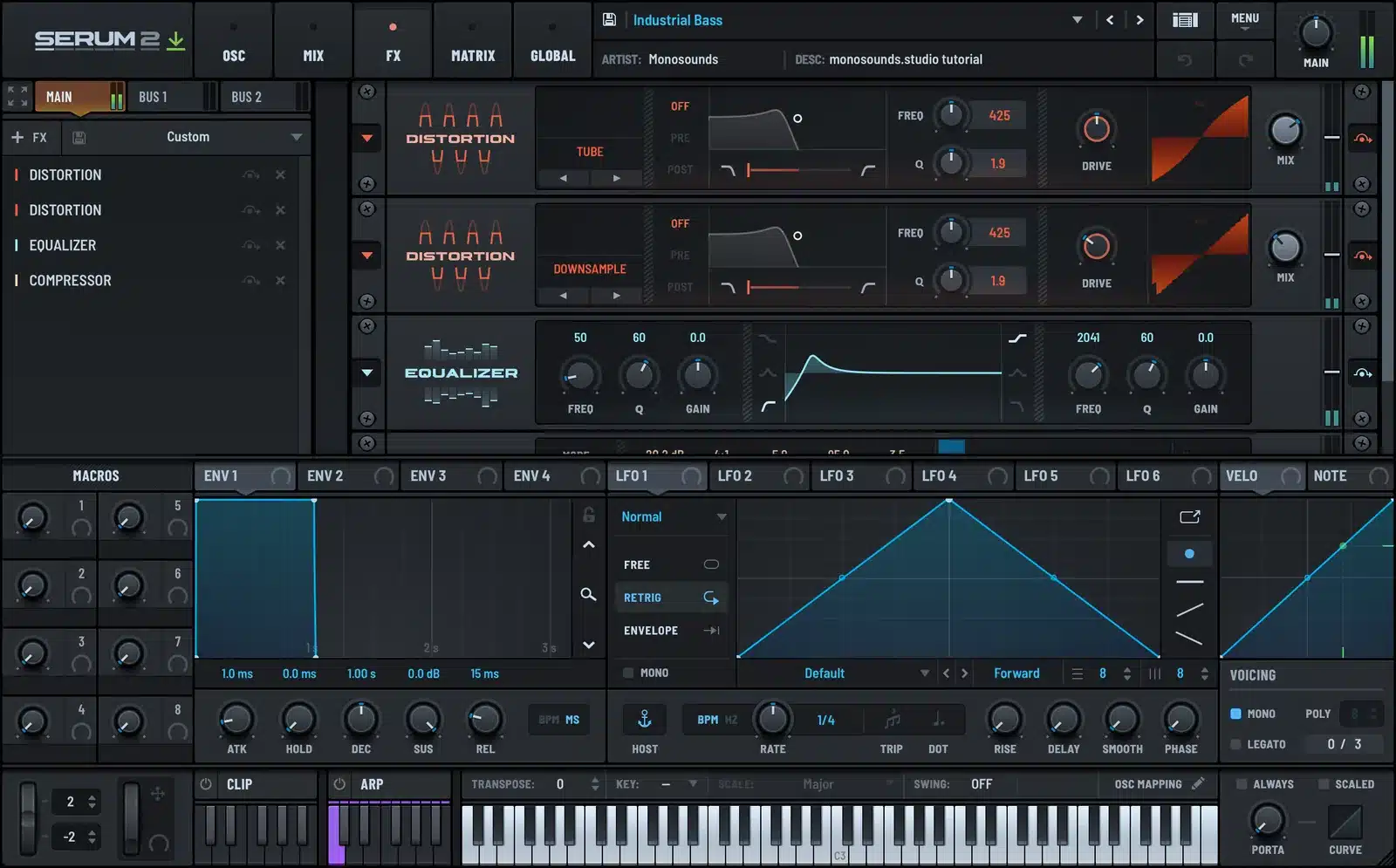
Add a lowpass with resonance near 30 percent, then build the distortion stack in the FX rack: hard clip or tube stage first, and a bandpass filter behind it to strip everything the distortion generated above 4 kHz. Order beats amount every time. Distort a filtered signal and it sounds controlled; filter a distorted signal and it sounds dead.
Feed a slow LFO into the drive amount at 1/1 or 1/2. That tiny bit of movement separates a bass that loops from a bass that breathes. The effects guide gets deeper into rack order.
Metallic lead
Here’s where FM pays for itself. Point oscillator B at a high, bright wavetable and let it modulate oscillator A. Small FM amounts get you bell tones; big amounts get you clanging metal. Sweep through and stop wherever it sounds wrong in a good way.
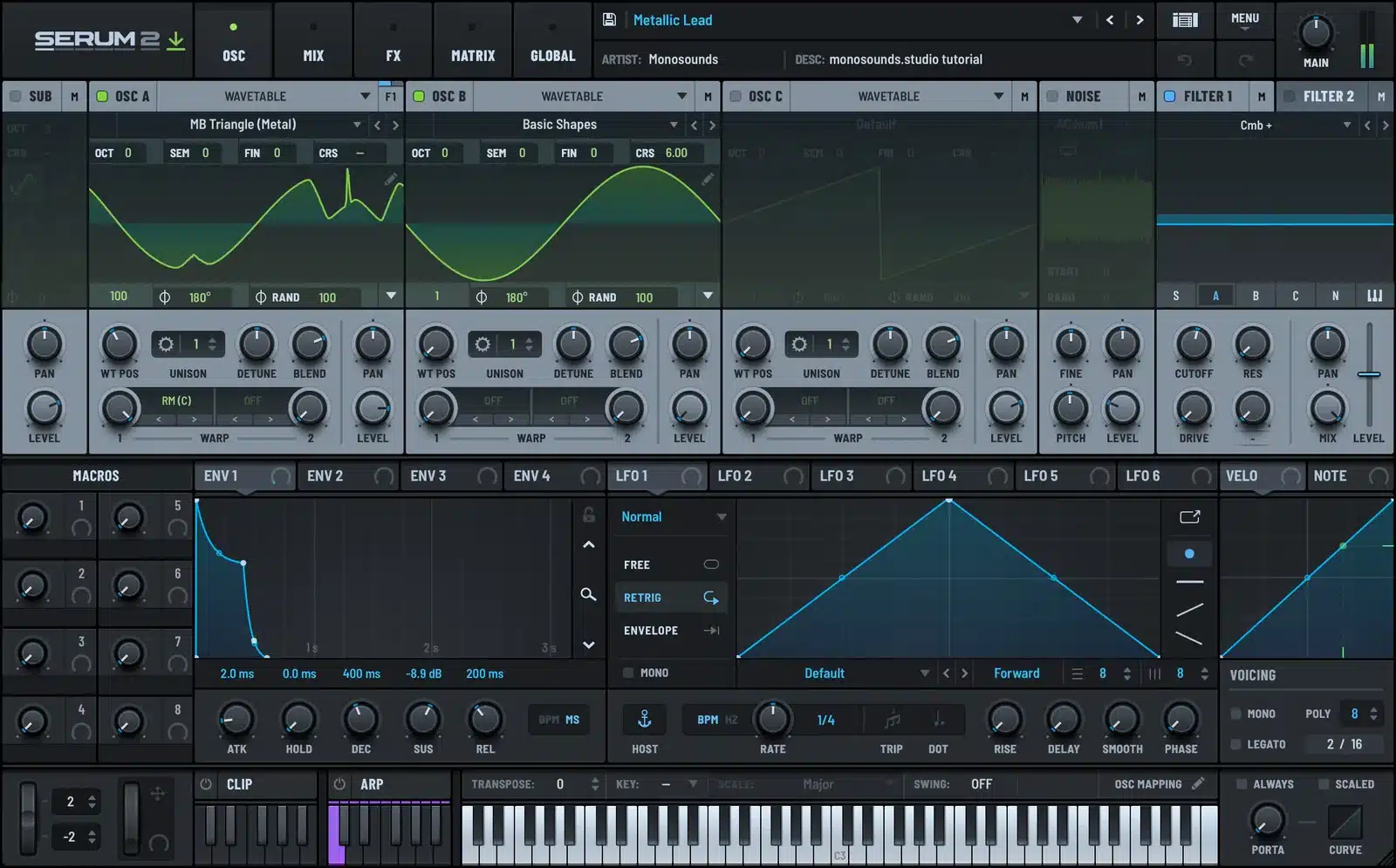
Follow it with a comb or a heavily resonant bandpass. Comb filtering is the ingredient that makes a sound register as struck metal instead of a synth. Nudge oscillator B off any musical interval (a few cents sharp of a tritone does it) so the result goes inharmonic.
Envelope: attack 0, decay 200–400 ms, sustain 0. This is a percussive sound, not a sustained one.
Growls and screams
These techniques share more DNA with bass music than anyone likes to admit. Two LFOs on filter cutoff at mismatched rates, one fast, one slow, plus wavetable position modulation, and you have a moving, vocal texture. Confine it to 200 Hz through 2 kHz so it stays out of the kick’s territory.
For the complete version of the trick, the growl tutorial walks the modulation routing step by step. Run it at half intensity for techno.
Noise and impacts
Risers: noise oscillator into a resonant bandpass, swept slowly. Impacts: same noise, a very short pitch envelope across the whole patch, and a long reverb on a send you gate by hand. Industrial impacts are mostly reverb decisions anyway.
Tempo, groove and arrangement
130–140 BPM. The bottom of the range leaves room for a heavy kick; the top pushes into harder territory where the kick turns shorter and clickier.
The groove stays rigid. Zero swing. Interest comes from percussion layers that refuse to share a grid: a metallic hit landing every 3 beats against a 4/4 kick sets up a slow phase that resolves every few bars.
An arrangement habit that works: automate one filter across the entire track. Take the bass lowpass, draw a slow curve from bar 1 to the last bar, and let it carry the long-form tension. The drops then become nothing more than parts entering and leaving above it.
Tracks typically run 6–7 minutes with long, unforgiving intros. Don’t hurry toward the first drop.
Mixing notes for industrial techno
Mono below 150 Hz. That’s higher than most genres, because otherwise the distorted bass smears stereo information straight into the kick.
Sidechain everything to the kick, not only the bass. Leads, noise, reverb returns, all of it. With distortion this heavy, every layer needs a hole carved in it for the kick.
Cut 2–4 kHz on the bass and on the leads separately. Distortion dumps harmonics precisely there, and once three distorted parts stack up, that region becomes unlistenable. A 3 dB dip on each usually settles it.
Loudness lives in the distortion, not the limiter. Drive the individual parts properly and the master should barely have a job. Which is, honestly, the entire point of the genre.
Keep an eye on the noise floor. Distortion amplifies hiss. High-pass every part at the highest frequency where it still keeps its character.
Common mistakes
Distorting everything the same way. Three parts through one saturator equals one blurred part. Give each its own flavour: clip on the bass, waveshaper on the lead, bitcrush on the percussion.
Making it too fast. Beginners hear aggression and grab 145 BPM. The records that actually land mostly sit at 132–136 and get their weight from sound design.
No dynamic range at all. When everything runs at maximum from bar one, nothing hits. Somewhere in the middle, leave the kick alone for 32 bars.
Forgetting the mid. An industrial track that’s all sub and treble sounds thin on a club system. Something has to live between 300 Hz and 1 kHz.
When you outgrow the freebies
These 13 patches came from the same sessions as my Serum 2 preset bundles, which gather whole genres for less than the packs cost individually.
Prefer choosing by style? Every Serum 2 pack I make lives in one place.
FAQ
Do these presets work in Serum 1?
No. They depend on the Serum 2 engine. Serum 2 is a free update for existing Serum owners, so it costs you a download, not a purchase.
Are they royalty-free?
Yes. Releases, client work, tracks you sell, no credit needed. The one restriction is redistributing the preset files.
How do I make a Serum 2 bass sound genuinely metallic?
FM one oscillator with the other, then follow it with a comb or high-resonance bandpass. Detune the modulating oscillator slightly away from any clean interval so the harmonics stop lining up.
What BPM is industrial techno?
130–140 BPM, and most releases land between 132 and 138. Going faster is a stylistic choice, never a requirement.
My distorted bass sounds harsh on headphones but weak on speakers — why?
The distortion is piling on upper harmonics while the fundamental gets lost. Split the bass into two bands: keep everything under 120 Hz clean and mono, and distort only the band above.

I run Monosounds.studio and make the packs myself. Ten-plus years of producing, 97+ releases, 16,000+ downloads. Every Serum 2 preset we ship passes a CPU check on a mid-range laptop and gets used in a real track before release. If it does not survive a mix, it does not go in the pack.
More about Maxim & the studio →

