A good pluck preset is often the thing standing between a sketch and a record. Plucks get used more than any other patch type in dance music, and they're the easiest to mess up: stretch them too long and everything smears, cut them too short and the drums swallow them whole.
Below I take apart how plucks get made in Xfer Serum 2 (the envelope shapes, filter tracking, and the delay settings that carry most of the load), and I'm giving away 15 presets so your starting point is a professional patch, not an init screen.
Here's the short version: a pluck is really an envelope trick. Which oscillator you pick matters way less than people assume.
Start with the free pack
Grab the Free Serum 2 Pluck Presets: 15 Pluck presets, all royalty-free, each with its own audio demo. Installation is under a minute: unzip into Serum 2's user preset folder, hit rescan.
The set runs through the main flavours: dry house plucks, wide detuned patches for progressive, a couple of bell-ish sounds for trap and future bass, and two dark filtered plucks aimed at techno. Decay, filter and wet level sit on macros, so moving those three knobs is the quickest way to make any patch your own.
If you write melodic dance music and keep grabbing the same stock pluck out of habit, this set gives you some actual variety to reach for.
The sound, part by part
The envelope
This is the entire sound. Zero attack, decay between 150–400 ms, sustain at zero, release just short enough that notes don't overlap. Push past 500 ms and you no longer have a pluck.
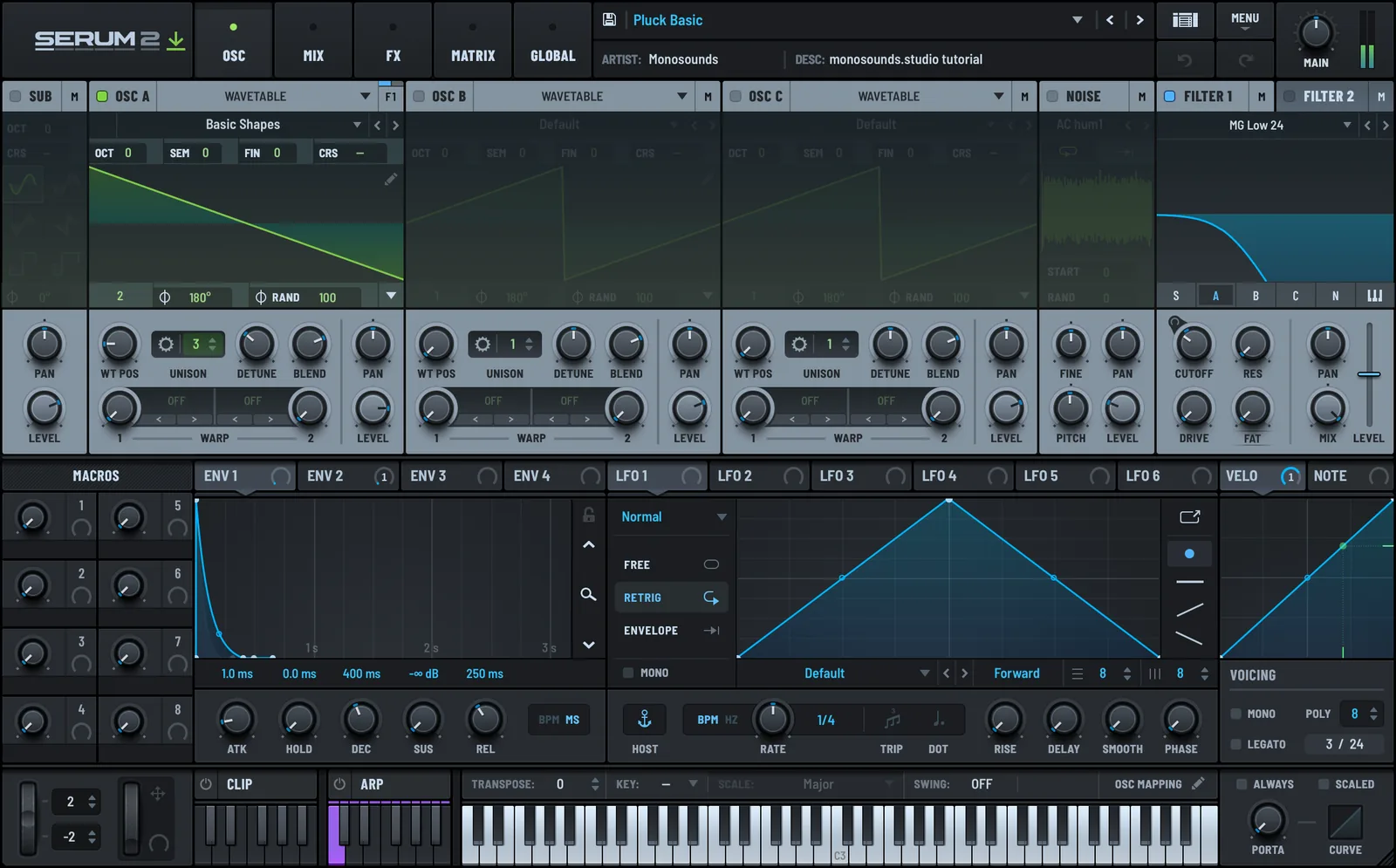
Now mirror that shape onto the filter. A second envelope on cutoff, opening 30–50% and closing back over 100–250 ms, is what makes the note feel struck instead of faded in. Matching decays on both envelopes leaves the patch flat; run the filter envelope a bit faster than the amp envelope and the bite shows up.
Oscillator and filter
A saw covers almost every case. Go square for a hollower, more retro tone. It's also worth playing with Serum 2's granular and spectral oscillators here; a short burst of grains produces a pluck no wavetable can touch.
Default to a 24 dB low-pass, though a band-pass with resonance near 40% gets you that classic thin house pluck, the kind that cuts straight through with zero low end. Switch keytracking on so the top notes stay bright while the low ones stay round; skip it and the patch goes dull an octave up. The filter guide walks through which filter types hold their character when resonance is high.
Unison and detune
Plucks need less unison than leads do. Stick to 3 to 4 voices with detune between 0.08 and 0.18. On a short note, wide detune sounds like chorus rather than size, and it smudges the attack — the one thing a pluck can never afford to lose.
The FX chain
No synthesis decision helps a pluck as much as delay does. Set 1/8 dotted, feedback 25–40%, wet near 25%, then high-pass the delay return at 400 Hz to keep the repeats from crowding anything.
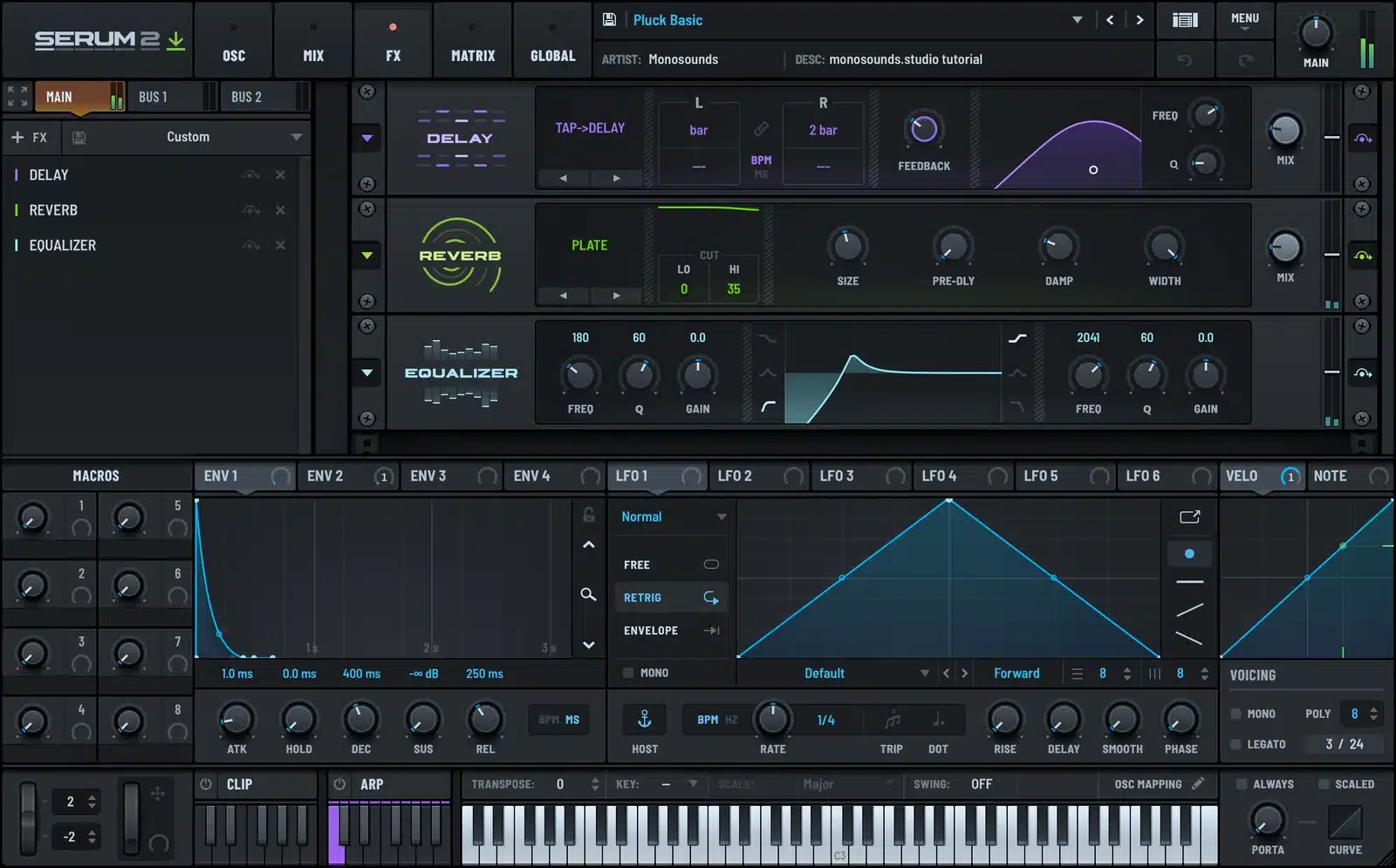
Follow it with a short plate: 1 to 1.5 seconds, wet below 20%, high-passed too. Chorus goes last, gently, and only when the patch genuinely wants width. The effects guide gets into the ordering properly.
Here's a pluck out of one of my paid packs; listen to how the delay handles the rhythmic side:
Tempo, groove and arrangement
Match decay length to tempo. Around 120–126 BPM, a 300–400 ms decay keeps air between the notes. Up at 138–150 you need 150–250 ms, otherwise notes bleed into one another.
The best pluck patterns are 1/16 or 1/8 lines with holes in them. Fill every sixteenth for a full bar and the part turns into wallpaper; pull out two or three steps and suddenly it's a hook.
One arrangement move worth stealing: run two plucks on the same notes: one dry down the centre, one soaked in delay and panned out wide. Ride the wet one up through the breakdown, back down for the drop. That trick covers most melodic hooks in dance music, and it's precisely how future bass treats its melodic layer.
Mixing notes for plucks
High-pass at 250–350 Hz. A pluck almost never earns its low end, and once it's gone you can push the fader far harder.
Set the delay and reverb returns higher than the dry high-pass, at 400–600 Hz. Cloudy melodic mixes are nearly always wet low mids.
Sidechain the reverb return against the kick rather than the pluck. The dry note is already short enough to dodge everything on its own.
Want brightness? Shelf at 6–8 kHz instead of pushing the fader. The attack stays sharp without the sustain creeping up.
Common mistakes
Overlong decay. If there's no audible silence between notes at your tempo, cut the decay by a third and the whole mix tightens up.
Skipping the filter envelope. Amp envelope alone sounds like someone gated a pad. The closing filter is what sells the physicality.
Reverb overload. Plucks live short and dry, with delays supplying the width. Throw a big reverb on one and you've built a pad you can't control.
No keytracking. Leave it off and one patch is bright at C3, muffled at C5, and you find yourself building four patches where one would do.
When you outgrow the freebies
These 15 patches were designed in the same sessions as our Serum 2 preset bundles: full genre collections costing a fraction of what the packs run individually. Only after one genre? The rest of my Serum 2 presets come as single packs as well.
FAQ
Do these presets work in Serum 1?
No, they're built on the Serum 2 engine. If you own Serum 1, Serum 2 is a free update.
How long should a pluck's decay be?
Usually 150–400 ms. Go shorter at fast tempos, longer around 120–126 BPM, and always leave enough gap to hear silence before the next note lands.
My pluck sounds muddy when I play chords. What is wrong?
Nine times out of ten it's the high-pass and the reverb. Push the high-pass up to 300 Hz, halve the reverb wet, and high-pass the reverb return at 500 Hz before you touch anything else.
Are they really royalty-free?
Yes. Releases, client work, beats you sell, no credit required.
Can I use them in any DAW?
Any DAW that can host Serum 2: Ableton, FL Studio, Logic, Cubase, Studio One and so on.

I run Monosounds.studio and make the packs myself. Ten-plus years of producing, 97+ releases, 16,000+ downloads. Every Serum 2 preset we ship passes a CPU check on a mid-range laptop and gets used in a real track before release. If it does not survive a mix, it does not go in the pack.
More about Maxim & the studio →

