Nothing makes a beat sound amateur faster than an out-of-tune 808. Most people never even register it as a tuning issue; they just sense the low end is off, then start grabbing EQ or piling on distortion, when the actual fix takes thirty seconds.
This is the method I use. Five minutes, any DAW, and after a handful of beats you’ll do it without thinking.
Step 1: Know the key of your track
Before you go near the 808, work out what key the track is in. Wrote the melody yourself? Find the note everything wants to resolve to — that’s usually your root.
Working with a flipped sample? Throw a key-detection plugin or a tuner on it, or use your ears: play single piano notes underneath the loop until one locks in perfectly.
Then write the key down. Half of the tuning problems I run into started with someone guessing the key wrong and then meticulously tuning everything to the wrong note.
Step 2: Find the 808’s real pitch
Now for the annoying part: 808 filenames lie. A file named 808_C.wav is frequently 20 or 30 cents out, and sometimes it isn’t even the right note. I’ve bought commercial kits where a third of the samples carried wrong labels.
So check it yourself. Solo the 808, drop a tuner plugin on the channel. An 808 is close enough to a pure sine that any guitar-style tuner tracks it fine. A spectrum analyzer does the job too: locate the lowest big peak and map the frequency to a note.
Quick reference: C1 is 32.7 Hz, E1 is 41.2 Hz, F1 is 43.7 Hz, G1 is 49 Hz, A1 is 55 Hz. A peak at 49 Hz on your analyzer means you’re holding a G1.
Step 3: Tune it to the root
Move the sample until its true pitch lines up with your root note:
- Transpose by semitones to the closest correct note.
- Nudge the fine tune in cents until the tuner sits still.
- Re-save the fixed sample so hitting C on your keyboard really plays C. Once per sample, not once per beat.
This is the sort of 808 that tunes easily — a single clear fundamental with a bit of drive on top, nothing confusing the tuner.
Step 4: Pick the octave and check it against the kick
Same note in a different octave gives you a completely different track. My rule of thumb: keep the 808’s fundamental somewhere between 35 and 55 Hz. Go lower and most playback systems reproduce next to nothing; C1 at 32.7 Hz all but vanishes on a car stereo. Go much higher and the 808 stops carrying weight.
Which is why keys like C and D often want the 808 an octave above where you’d assume, while F, G and A sit low naturally.
Then audition it next to your kick. A kick with a tonal tail needs that tail agreeing with the 808, or the low end starts wobbling. That particular fight gets its own writeup in mixing bass and kick.
Step 5: Keep glides in key
Slides are half the joy of an 808, and they fail in exactly one way: the glide lands somewhere outside your scale. Every slide should begin and end on scale notes: the root, the fifth, or the b7, most of the time.
Set portamento to constant time, roughly 40–80 ms. Constant rate misbehaves on big jumps and makes long slides feel sluggish. Keep the 808 mono with legato triggering too, so each new note chokes the previous tail instead of piling two subs on top of each other.
Why I moved my 808s into Serum 2
Tuning samples works, but eventually I quit fighting it. A synthesized 808 is in tune by definition: sine or triangle oscillator, a fast pitch envelope for the attack click, drive for character. Glides, note choking and velocity response turn into synth settings rather than sample surgery.
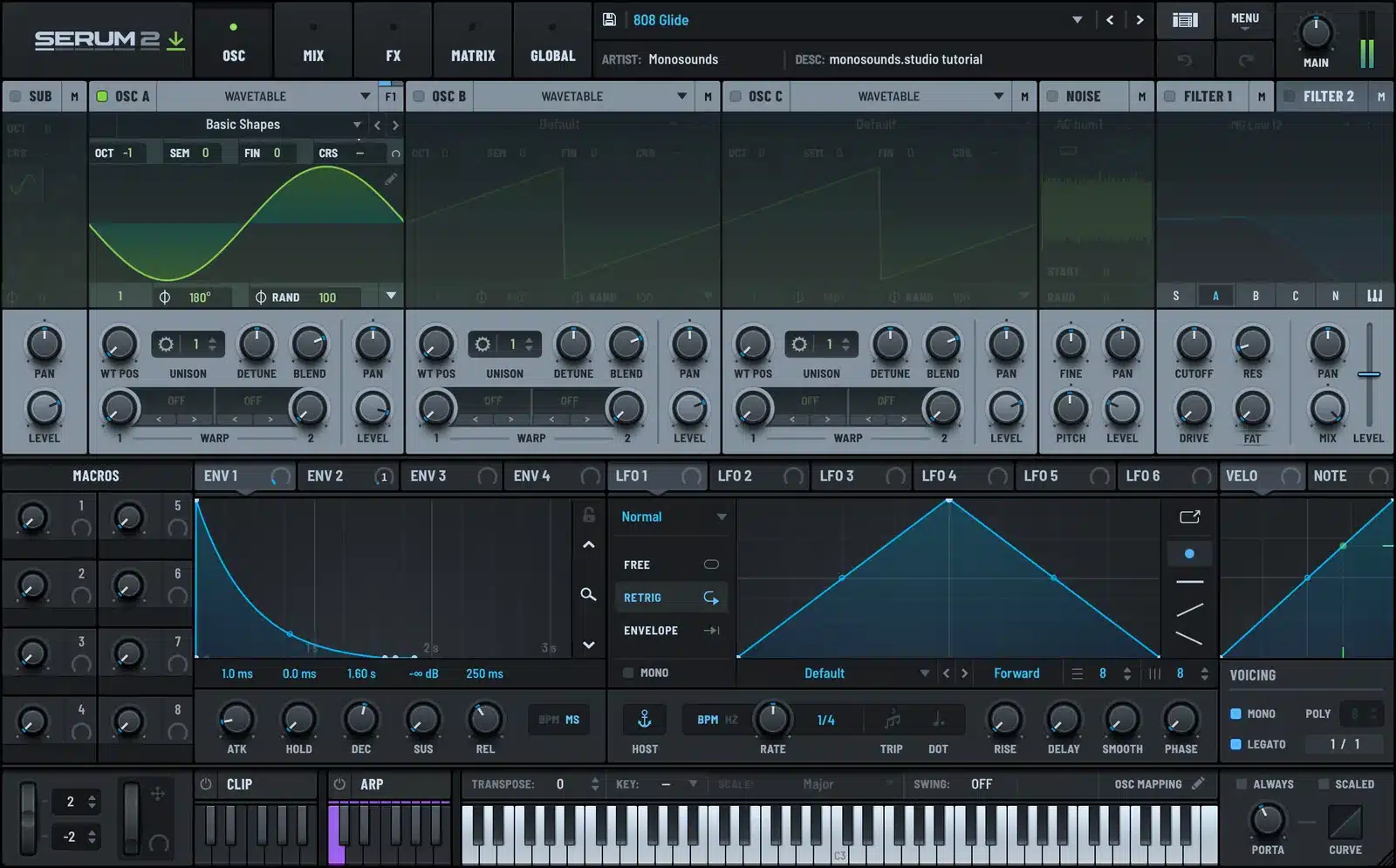
Curious how that gets built? Grab the free Serum 2 presets and dissect the bass patches; watch what the pitch envelope and the drive are doing. The full patch recipe is also laid out in my Serum 2 808 guide.
And once the freebies run out of road, the Serum 2 preset bundles are the cheapest route to our complete 808 and bass collections in one purchase.
For reference, here’s a tuned, produced 808 sitting exactly where it belongs.
FAQ
Do I need to tune every 808 sample?
Verify each one at least once. Filenames are wrong often enough that a ten-second tuner check pays for itself. Re-save the corrected file and it’s done forever.
What if my 808 has no clear pitch?
Heavy distortion can throw tuners off. In that case, read the fundamental off a spectrum analyzer, or tune by ear against a sine wave holding the root note.
Should the 808 and kick be the same note?
Not necessarily. The kick’s tail needs to sit in the same key, but the notes belong to the 808. A short punchy kick with no tonal tail needs no tuning whatsoever.
Why does my 808 sound fine solo but off in the mix?
The octave is the usual culprit, not the tuning. A fundamental under 35 Hz gets masked and only the harmonics reach your ears. Try the identical note an octave higher. The 808 patches in all our Serum 2 preset packs are voiced with exactly this in mind, so they translate before you’ve touched a thing.
And that’s the entire method: know the key, verify the pitch, tune it, choose the octave, glide inside the scale. Five minutes now spares you a low end no mixing stage can rescue.

I run Monosounds.studio and make the packs myself. Ten-plus years of producing, 97+ releases, 16,000+ downloads. Every Serum 2 preset we ship passes a CPU check on a mid-range laptop and gets used in a real track before release. If it does not survive a mix, it does not go in the pack.
More about Maxim & the studio →

