Two great synths, and the truthful starting point is that neither one will ever be the thing holding your tracks back. What separates them is workflow, ecosystem, and honestly, what kind of producer you happen to be.
Cards on the table before anything else: making and selling Serum presets is my business, so neutrality isn’t on offer here. Where Pigments genuinely comes out ahead, I’ll say so, and it does, in a few spots.
Engines: both are multi-synths now
In one engine, Serum 2 hands you wavetable, granular, spectral, and sample oscillators. Pigments counters with its own lineup: virtual analog, wavetable, sample and granular, and a harmonic engine on top. Read the spec sheets side by side and the overlap looks huge.
The split shows elsewhere. Pigments has a genuinely good virtual analog engine: when you want that classic saw-into-filter warmth without imitating it via wavetables, Pigments gets you there more honestly. Serum 2 pulls in the opposite direction with its spectral processing and the sheer depth of its wavetable editing: surgical, modern sound design territory.
Workflow and UI
Let’s be fair: the Pigments interface is one of the prettiest ever put on a synth. The whole thing animates, every modulation source visibly moving in real time, which turns it into a fantastic teacher. Anyone confused by modulation routing will stop being confused faster inside Pigments.
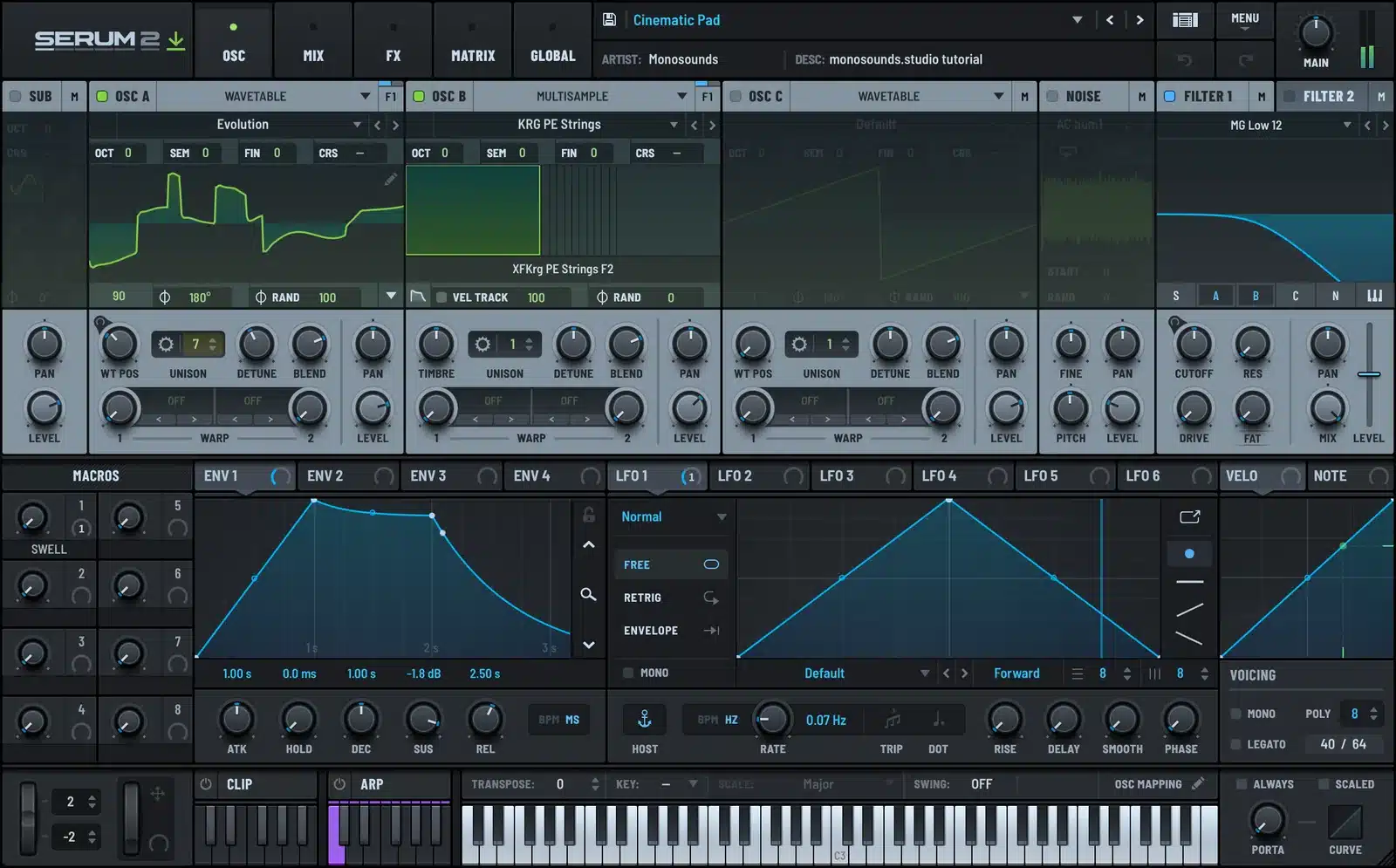
Serum 2 packs more into less space and skips the beauty contest, but once your hands know it, it’s quicker. Drag-and-drop modulation flies in either synth; where Serum pulls ahead is the wavetable editor and frame-by-frame precision. My personal split: Pigments is the better synth to wander around in, Serum is the better one to sit down in when the target sound is already in your head.
The ecosystem gap
Here’s where most people’s decision actually gets made, and the margin is wide. No synth has a bigger third-party universe than Serum: presets, wavetables, tutorials, whole courses. Pigments ships with solid factory sounds and Arturia keeps releasing its own expansions, but the outside market is a small fraction of Serum’s.
In practice that means: hear a sound in a track, and odds are somebody already built a Serum preset or filmed a Serum tutorial for it. This is the kind of thing that preset ecosystem turns out — a house demo pulled from one of our packs:
Want to gauge the supply gap firsthand without spending money? Tear apart our free Serum 2 presets and notice how much of today’s preset design simply assumes you’re on Serum.
Sequencers, arps, and the extras
Arpeggiators and sequencers come standard in both. The Pigments sequencer has a generative streak: sprinkle in some step randomization and it composes happy accidents on your behalf, perfect for sketching ambient or melodic techno. Serum 2’s answer is the CLIP tab: banks of MIDI clips, 12 slots per bank, so you audition presets against actual musical phrases rather than a held chord. Two philosophies in miniature: Pigments tries to surprise you, Serum tries to make you faster.
CPU and practical stuff
Next to a basic subtractive plugin, both of these are hungry, and both make you pay for stacked unison and per-instance reverb. No efficiency gap between them would register in a normal session, so budget for freezing tracks whichever way you go. Both run natively on Apple Silicon and come in all the usual plugin formats.
Price and how you pay
Prices shift too often to quote, but the payment models genuinely differ. Serum 1 owners got Serum 2 as a free update, and rent-to-own plans are available for it. Arturia, meanwhile, runs deep and frequent Pigments discounts, and the bundling gets attractive fast if their ecosystem is already on your drive. Be patient with either company and you’ll never pay sticker.
Who should pick which
- Pick Pigments if you’re still learning synthesis and want an instrument that teaches as you go, if virtual analog warmth is where you live, or if Arturia gear already fills your folder.
- Pick Serum 2 if bass music, house, EDM, or pop is your lane and you want the ecosystem at your back, if tutorials are how you learn, or if presets play a real part in how you work.
- Own both eventually? Lots of pros do exactly that. In real use they overlap far less than the feature lists imply.
Should Serum win and a real preset library start calling, the Serum 2 preset bundles are the best-value path there — the single properly biased sentence in this piece, and still an accurate one.
For the rest of the field, I’ve also written up Serum 2 vs Vital and ranked everything current in best wavetable synths in 2026.
FAQ
Is Pigments better than Serum 2?
Not outright, in either direction. Pigments brings the friendlier interface and a real virtual analog engine; Serum 2 brings deeper wavetable editing plus a preset and tutorial world many times the size.
Is Pigments easier to learn than Serum 2?
As an interface, yes: nothing explains modulation as clearly as its animated view. Over a span of months, though, Serum 2’s mountain of tutorials counts for more.
Can Pigments use Serum presets?
No. Every synth locks presets to its own format, and that lock-in deserves a thought before you invest in a library. Everything in our Serum 2 preset catalog only opens in Serum, just as Arturia’s packs only open in Pigments. Know that before your first purchase.
Which is lighter on CPU?
Same weight class, honestly. How a patch is built matters far more than which synth hosts it — big unison stacks are expensive everywhere.
Forced to boil it down to a sentence: Pigments is the better synth to explore, Serum 2 is the better synth to belong to. And most people badly underrate how much that second thing is worth.

I run Monosounds.studio and make the packs myself. Ten-plus years of producing, 97+ releases, 16,000+ downloads. Every Serum 2 preset we ship passes a CPU check on a mid-range laptop and gets used in a real track before release. If it does not survive a mix, it does not go in the pack.
More about Maxim & the studio →

