The setup itself is a five-minute job: installer, default VST3 path, one FL Studio scan, and Serum 2 appears as a generator. Everything after that is where it gets interesting, so most of this article is the FL workflow I actually use.
Black Friday · until Nov 3014 packs for $9- Black Friday Pack, 14 packs
$296$9 - Duovox synth plug-in
$59$19 - All 86 packs in the shop
$1,651$49
Install and scan
- Run the Serum 2 installer and leave the VST3 location at its default. Custom paths are the single biggest source of “where is my plugin”.
- In FL Studio’s plugin manager, run a scan with “verify plugins” turned on. That way FL genuinely opens each plugin rather than just cataloguing files.
- Flag Serum 2 as a favorite so it shows up in the add menus without any digging.
- Drop it into the channel rack like any other generator and hit a note to confirm you get audio.
When the scan misses it, the culprit is nearly always a path or format problem rather than a broken install. Every fix I know is collected in Serum 2 not showing up in your DAW.
Sort out presets before anything else
Manage presets through Serum’s own browser instead of FL’s plugin database. Serum’s browser reads the User folder, displays your packs as folders, and follows you if you ever switch DAWs.
Third-party packs belong in the User presets folder; the complete walkthrough lives in how to install Serum 2 presets. Library sitting empty? Begin with our free Serum 2 presets — that gives you enough sounds to follow the rest of this article hands-on rather than in theory.
Automation clips on macros, not raw knobs
Here’s where FL shines with Serum 2. Right-click any control, choose create automation clip, and a drawable curve appears in the playlist. No arming anything, no lane menus.
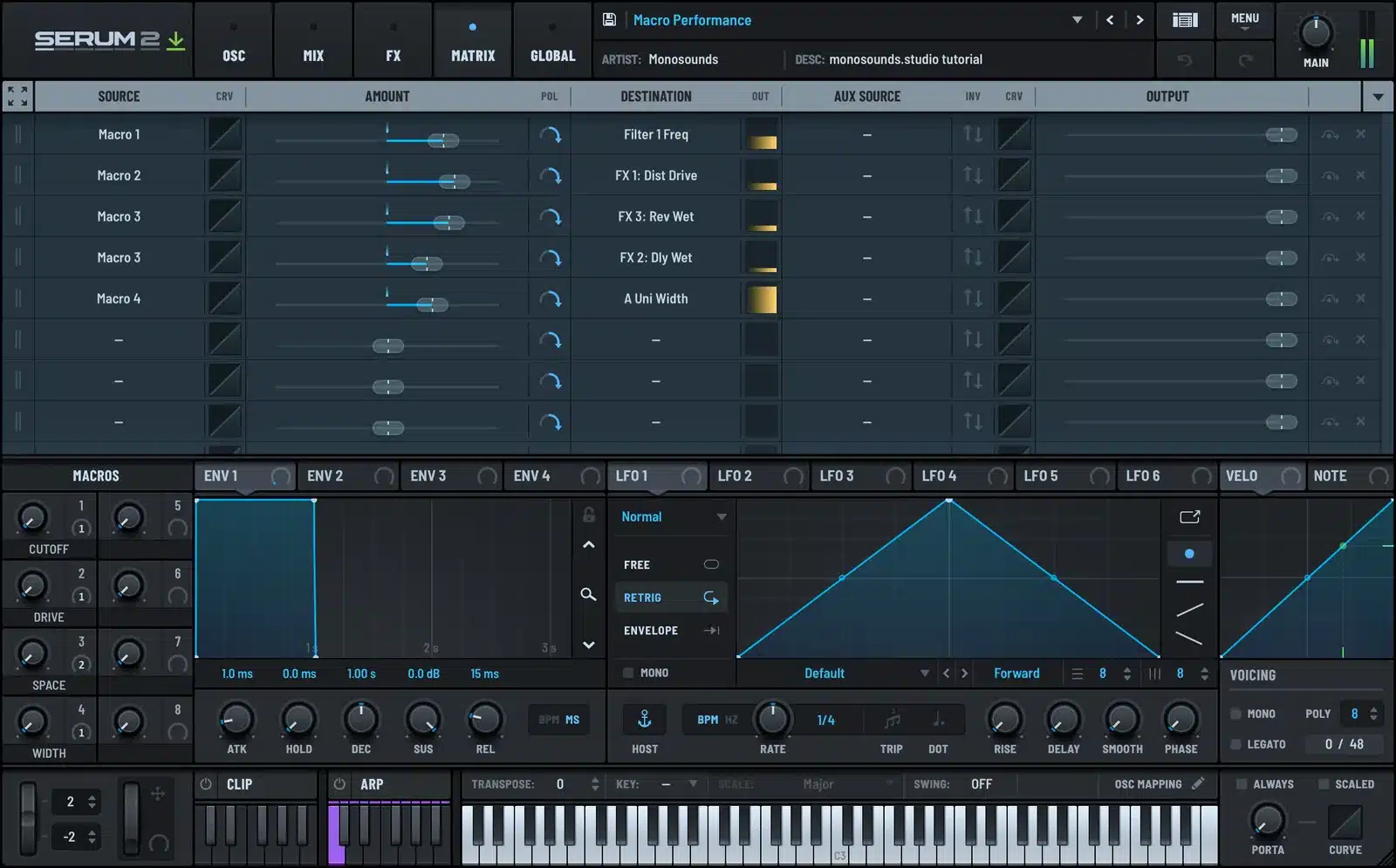
Point those clips at Serum’s macros rather than raw parameters, for two reasons. Preset makers scale macros to musical ranges, meaning the entire knob sweep stays usable; automate raw cutoff instead and you’ll be trimming the curve so it doesn’t dive subsonic. On top of that, a single macro frequently drives several parameters, so one clip covers the work of four.
A habit of mine: before the drop gets written, every lead gets automation clips on macros 1 and 2. Cheap insurance that the builds and drops move instead of sitting flat.
Layering with Patcher
Want thick leads? Load a Patcher instance, place two copies of Serum 2 inside it, and save the whole assembly as a single Patcher preset.
What actually makes layers work: nudge the top layer’s detune, high-pass it near 200 Hz so exactly one layer owns the low end, and lock the sub layer to mono. Stack two full-range presets without doing that and you’ll get mud where you wanted width. Patcher introduces no latency worth mentioning, so there’s no cost.
Audition with the CLIP tab, write in the piano roll
The CLIP tab in Serum 2 stores banks of MIDI clips, 12 slots to a bank, which play patterns through whatever preset is currently loaded. In FL I treat it as a preset-browsing tool: trigger a clip, flip through presets, and judge every sound on a real musical phrase instead of a single held note.
When a sound wins the audition, the actual part gets written in FL’s piano roll and the clip stays untouched. Clips are for auditioning; the piano roll is the single source of truth for the arrangement. Blur that line and parts start vanishing at export time.
FL-specific CPU tips
- Turn on smart disable for plugins. FL suspends instances that go silent, which is free CPU in projects stuffed with presets.
- Skip bridging Serum 2 unless there’s a concrete reason for it. Bridged plugins carry overhead.
- Render finished parts to audio and mute the generator. FL makes the bounce fast, and a rendered clip costs nothing to play.
- Once you’re done recording parts, push the buffer up — 512 samples handles arranging and mixing fine.
Where to grow the library
When the freebies start feeling tight and you’ve figured out which genres you actually finish tracks in, the Serum 2 preset bundles give you the best per-preset value: cheaper than buying single packs one by one, and installation works exactly as described above.
FAQ
Where do I put Serum 2 presets for FL Studio?
Into Serum’s own User presets folder, never anywhere inside FL. Serum’s browser then finds them in every DAW you own. Everything from the complete pack list installs identically: one folder, visible to every DAW on the machine.
Why isn’t Serum 2 in my FL plugin list?
Most often the VST3 path is missing from FL’s search paths, or the scan ran without verification. Check the path list first, then rescan with “verify plugins” enabled.
Should I automate Serum 2 knobs or macros?
Macros. The preset designer has already scaled them to musical ranges, and one curve frequently moves multiple parameters.
Does Patcher add latency to Serum 2?
Nothing audible. Layer as much as you like — the actual danger is frequency mud, and the high-pass trick above takes care of it.
And that’s the entire FL setup: one scan, presets living in Serum’s browser, automation on macros, early bounces. Boring habits, sure, but they separate fighting FL from finishing in it.

I run Monosounds.studio and make the packs myself. Ten-plus years of producing, 97+ releases, 16,000+ downloads. Every Serum 2 preset we ship passes a CPU check on a mid-range laptop and gets used in a real track before release. If it does not survive a mix, it does not go in the pack.
More about Maxim & the studio →

